Blog

  • ERPNext Retail Oman POS: Master Unified Store and Back-Office Operations for Omani Retailers

    ERPNext Retail Oman POS: Master Unified Store and Back-Office Operations for Omani Retailers

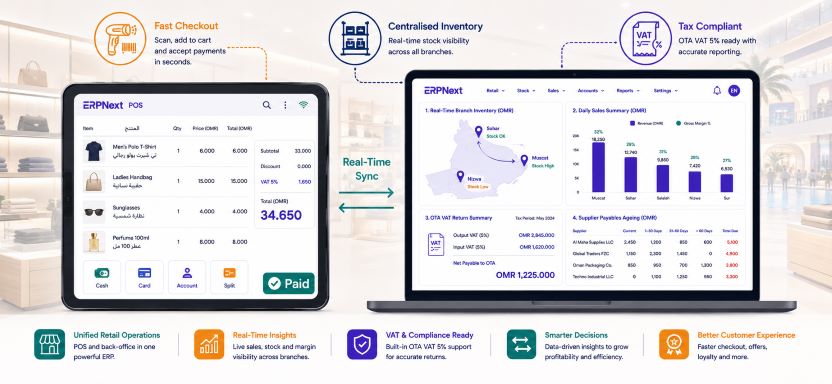
    ERPNext retail Oman POS integration is transforming how retail businesses across the Sultanate manage the gap between what happens at the checkout counter and what appears in the finance system. Omani retailers, from independent pharmacies and electronics shops in Muscat’s Qurum district to multi-branch supermarkets and fashion retailers operating across Ruwi, Al Khuwair, and Sohar, all face the same structural problem: their point of sale system and their back-office accounting live in separate worlds.

    Sales are rung up at the till, but inventory does not update until someone runs a report. VAT is collected from customers but reconciled manually days later. Cash differences between the POS and the bank deposit are investigated through handwritten till receipts. The Ministry of Commerce, Industry and Investment Promotion continues to push for retail sector formalisation and digital compliance, and the gap between how most Omani retailers operate and what regulators expect is widening. ERPNext closes that gap entirely. This guide explains how.

    Why ERPNext retail Oman POS unification matters for Omani retailers

    The disconnection between POS and back-office is not simply an inconvenience. It is a source of financial inaccuracy that compounds with every transaction. When a sale at a Muscat electronics retailer is processed through a standalone POS terminal, four things should happen simultaneously: the customer’s invoice is generated with correct VAT, the inventory level of the sold item decreases, the revenue is posted to the correct GL account, and the cash or card payment is recorded in the finance system. In a disconnected environment, only the first step happens automatically. The other three happen manually, hours or days later, when someone has time to update the back-office system. Errors introduced in that manual transfer accumulate into stock discrepancies, VAT mismatches, and financial reports that do not reflect trading reality.

    ERPNext retail Oman POS eliminates the manual transfer entirely. Every transaction at the POS terminal posts simultaneously to inventory, the GL, and the VAT ledger in real time.

    Key retail performance improvements with ERPNext POS:

    • 80% reduction in end-of-day cash reconciliation time compared to manual till-to-system processes
    • Real-time inventory accuracy across all branch locations from the moment of each sale
    • VAT-compliant tax invoices generated automatically at the point of sale for every transaction
    • Zero manual data entry between POS and back-office accounting after ERPNext go-live

    How ERPNext retail Oman POS works: the unified transaction flow

    Point of sale interface for Omani retail staff

    The ERPNext POS interface is designed for retail speed. A cashier in an Omani pharmacy, electronics store, or fashion outlet opens a POS session, selects items by barcode scan or search, applies any configured discount or promotion, selects the payment method, and closes the transaction. The interface supports touchscreen operation, barcode scanner integration, receipt printer connection, and cash drawer management. Arabic and English item descriptions display simultaneously, and the receipt prints in both languages with the retailer’s Tax Registration Number and the correct VAT breakdown as required by Omani VAT regulations.

    The entire transaction takes the same amount of time as any modern retail checkout. The difference is what happens behind the scenes the moment the sale is confirmed.

    Real-time back-office posting from every POS transaction

    The moment a sale is completed in the ERPNext retail Oman POS, four automatic back-office entries occur without any human intervention. The inventory level of every sold item decreases by the quantity sold at the branch warehouse location. The revenue amount posts to the correct income account in the chart of accounts by product category. The VAT amount posts to the output VAT liability account for inclusion in the next OTA return. The payment amount posts to the correct settlement account, whether cash, card, or customer account credit. By the time the cashier hands the customer their receipt, the finance system already reflects the transaction completely and accurately.

    POS Transaction EventERPNext Back-Office ActionTiming
    Item scanned and added to saleInventory reservation createdInstant
    Sale confirmedStock level reduced at branch warehouseInstant
    Payment receivedGL revenue entry posted by categoryInstant
    VAT collectedOutput VAT ledger updated for OTA returnInstant
    Cash paymentCash account balance updatedInstant
    Card paymentCard clearing account entry createdInstant
    Receipt printedCustomer invoice archived in ERPNextInstant
    Shift closedDaily sales summary posted to accountsEnd of shift

    Inventory management across Omani retail branches with ERPNext

    Real-time stock visibility across all store locations

    ERPNext retail Oman POS inventory management gives retail operations managers and buyers a live view of stock levels across every branch simultaneously. A fashion retailer with five outlets across Muscat, Sohar, and Nizwa can see the exact quantity of every SKU at every location from a single dashboard without calling store managers or waiting for nightly stock extracts. When a customer at the Qurum branch asks for a size that is out of stock, the sales associate can check ERPNext in real time, confirm that the Al Khuwair branch has the item, and arrange a branch transfer or customer order without leaving the till area.

    Automatic reorder and centralised buying

    When any branch stock level falls below the configured minimum, ERPNext generates a purchase request automatically and routes it to the central buying team for supplier order placement. This automated reorder capability eliminates the stock-out situations that arise when store managers forget to raise replenishment requests, or raise them too late for the supplier lead time to be met. The central buying team manages supplier relationships, negotiates pricing, and raises purchase orders from the ERPNext procurement module, which feeds directly into the inventory receiving workflow at each branch.

    Inter-branch stock transfers with full approval workflow

    Retail businesses with multiple Omani locations frequently need to balance stock between branches to match demand patterns. ERPNext inter-branch transfer workflow allows a store manager to raise a transfer request digitally, the operations manager approves it, and both the sending and receiving branch inventory updates the moment the transfer is confirmed. There is no phone call, no WhatsApp message, and no manual stock adjustment. The audit trail is complete, and both branch inventory records are accurate at all times.

    ERPNext retail Oman POS inventory accuracy across multi-branch Omani retailers improves from an industry average of 70 to 80% to above 95% within three months of go-live, driven primarily by the elimination of manual stock adjustment entries and the real-time posting of every POS transaction directly to branch inventory.

    VAT compliance for Omani retailers with ERPNext POS

    Automatic VAT on every retail transaction

    Every sale processed through the ERPNext retail Oman POS applies the correct VAT treatment automatically based on the item configuration. Standard-rated items at 5% are the most common category for Omani retailers, but businesses selling a mix of standard-rated, zero-rated, and exempt items, such as pharmacies selling both taxable health products and VAT-exempt medicines, configure each item category with its correct VAT treatment in the item master. The POS applies the right rate to the right item on every transaction without the cashier needing to know or decide anything about VAT.

    OTA-ready VAT reporting from retail POS data

    At the end of each VAT filing period, the ERPNext VAT return report consolidates all output VAT collected through every POS terminal at every branch location into the OTA-formatted return. There is no manual aggregation of daily POS summaries, no spreadsheet compilation from multiple branch reports, and no risk that a branch’s VAT data is missed or double-counted. The VAT return reflects every retail transaction from every Omani branch location automatically, giving the finance team a report that is ready for OTA submission without any manual intervention.

    Customer tax invoices for B2B retail purchases

    Omani retailers frequently sell to business customers who require a full tax invoice with the buyer’s TRN for their own input VAT claim. ERPNext retail Oman POS supports switching between a standard retail receipt for individual customers and a full tax invoice for business customers within the same POS session. The cashier selects the invoice type, enters the customer TRN if required, and the system generates the correct document automatically. This capability is particularly valuable for electronics retailers, office supply stores, and hardware outlets where a significant proportion of daily transactions are B2B purchases.

    Customer management and loyalty with ERPNext retail Oman POS

    Customer account and credit management

    ERPNext retail Oman POS supports customer account billing for corporate clients who purchase on credit terms. A corporate customer’s purchase is posted to their account receivable rather than settled immediately at the POS, and the finance team manages the monthly statement and collection process through the ERPNext accounts receivable module. Credit limits configured per customer prevent the POS from accepting account purchases beyond the approved limit, protecting the retailer from extending excessive credit to any single client.

    Purchase history and customer analytics

    Every purchase made by a registered customer through the ERPNext POS is stored against their customer record. Retail managers can view each customer’s purchase history, average transaction value, preferred product categories, and last visit date from the ERPNext CRM module. This purchase data drives more targeted stock purchasing decisions, informs promotional planning, and enables the commercial team to identify high-value customers who warrant personal relationship management.

    Back-office financial management for Omani retailers with ERPNext

    Automated daily sales reconciliation

    The end-of-day cash reconciliation process in a typical Omani retail business without ERP involves the shift supervisor counting the till, calculating expected cash from a paper transaction log, identifying any difference, and manually entering the day’s totals into an accounting spreadsheet. This process takes 30 to 60 minutes per shift per branch and introduces the errors that cash handling under time pressure always creates. ERPNext retail Oman POS automates this entirely. When the POS session is closed, ERPNext generates a session summary showing expected cash, card, and accounts receivable totals broken down by payment method. The supervisor enters the actual cash count, and any difference is posted to a cash variance account automatically, with the discrepancy amount and shift details recorded for management review.

    Profit and loss reporting by branch and product category

    ERPNext gives Omani retail management the branch-level financial visibility that most retail businesses in the Sultanate have never had. Monthly profit and loss reports filterable by individual branch, product category, or supplier allow retail directors to identify which locations are generating the strongest margins, which product categories are underperforming, and which suppliers are delivering the best landed cost efficiency. For a complete overview of ERPNext financial reporting capabilities for Omani businesses, visit our ERPNext implementation guide for Omani businesses.

    Accounts payable and supplier payment management

    The back-office procurement and payables function for an Omani retailer managing 30 to 100 active suppliers involves purchase order management, goods receiving against PO, supplier invoice three-way matching, payment scheduling, and bank reconciliation. ERPNext handles every stage of this cycle from the procurement module through to payment run and bank statement reconciliation. Suppliers are paid on time according to their agreed terms, input VAT on every supplier invoice is captured for the OTA return, and the accounts payable ledger reflects the accurate outstanding position at any moment without manual compilation.

    Implementing ERPNext retail Oman POS: recommended phase sequence

    1. Weeks 1 to 2: Configure chart of accounts in OMR, set up Oman VAT templates with standard-rated and exempt item categories, enter TRN, and configure POS settings including receipt templates in Arabic and English.
    2. Weeks 2 to 3: Build the item master with barcode numbers, VAT category, reorder levels, and branch warehouse assignments for every SKU in the product range.
    3. Weeks 3 to 4: Set up branch warehouse locations, configure inter-branch transfer workflows, and activate automatic reorder rules for fast-moving product categories.
    4. Weeks 4 to 5: Configure customer master for corporate account customers with credit limits, payment terms, and TRN fields. Set up supplier master with payment terms and landed cost categories for any imported product lines.
    5. Weeks 5 to 6: Set up POS hardware at each branch location, test barcode scanning, receipt printing, cash drawer integration, and card payment terminal connectivity.
    6. Weeks 6 to 8: Conduct staff POS training at each branch, run parallel operations for two to four weeks with both the old system and ERPNext, then go live branch by branch starting with the highest-volume location.

    Roll out ERPNext retail Oman POS one branch at a time rather than all locations simultaneously. The first branch go-live reveals any configuration adjustments needed, and subsequent branches benefit from a refined and tested setup with lower risk and faster adoption.

    Master unified retail operations in Oman with ERPNext POS

    ERPNext retail Oman POS gives Omani retailers of every size the unified platform they need to connect every sale at the checkout to real-time inventory, automatic VAT posting, and accurate back-office financials without manual data transfer, spreadsheet reconciliation, or month-end surprises. The combination of a fast, Arabic-English bilingual POS interface, real-time multi-branch inventory management, automated OTA-ready VAT reporting, and integrated supplier procurement creates an operational foundation that lets Omani retail businesses focus on serving customers and growing revenue rather than reconciling systems and correcting errors.

    Contact Gazelle today for a free ERPNext retail assessment tailored to your Omani store format, branch network, product categories, and go-live timeline.
  • ERPNext Trading Company Oman: Master Import and Export Operations for Omani Traders

    ERPNext Trading Company Oman: Master Import and Export Operations for Omani Traders

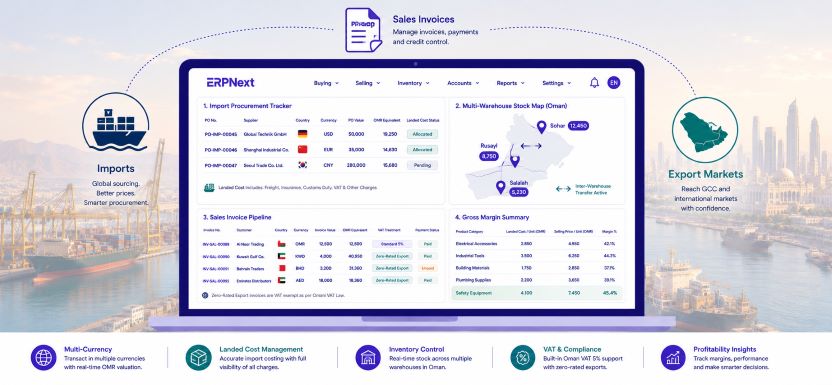
    ERPNext trading company Oman operations management is one of the most compelling use cases for the platform in the Sultanate. Omani trading companies sit at the intersection of the most complex business processes any SME can face: international supplier procurement in multiple currencies, customs clearance and landed cost allocation, domestic distribution across multiple governorates, VAT-compliant invoicing under Ministry of Finance regulations, and client billing that spans Omani private companies, government entities, and GCC export customers simultaneously.

    Most Omani trading companies currently manage this complexity through a patchwork of disconnected tools: a legacy accounting system, procurement tracked in spreadsheets, inventory managed in a separate warehouse application, and customer billing handled manually. ERPNext replaces all of it with a single unified platform built for exactly how Omani import and export trading businesses operate. This guide explains every capability that matters for your trading operation.

    Why ERPNext trading company Oman management solves a unique problem

    Omani trading companies face a set of operational challenges that generic accounting software was never designed to address. An electronics distributor importing from China and South Korea, reselling to retailers across Muscat, Sohar, and Salalah, and exporting to GCC buyers in Kuwait and Bahrain simultaneously manages USD purchase invoices, CNY supplier negotiations, OMR domestic sales, AED export invoices, Oman VAT on domestic supplies, zero-rated VAT on qualifying exports, landed cost calculations that vary by shipment, and inventory that moves between a central Muscat warehouse and regional distribution points. Each of these dimensions creates a specific management challenge. Together, they make manual systems not just inefficient but genuinely dangerous from a financial accuracy and compliance perspective.

    ERPNext trading company Oman implementation addresses every one of these dimensions from a single platform with no additional modules to purchase and no integration middleware to maintain between systems.

    Key trading company performance stats with ERPNext:

    • 50% reduction in time spent on monthly VAT reconciliation for Omani trading companies after ERPNext go-live
    • 3x faster landed cost calculation per import shipment compared to manual spreadsheet allocation
    • OMR 0 additional licence cost for the full ERPNext trading, procurement, and inventory suite
    • 40% reduction in stock discrepancies between central warehouse and branch locations within six months

    Import procurement management with ERPNext trading company Oman

    Supplier master and approved vendor management

    The import procurement cycle for an Omani trading company begins with supplier management. ERPNext stores every international supplier with their default transaction currency, payment terms, lead time, country of origin, and approved item categories. For a Muscat trading company sourcing from ten countries simultaneously, this centralised supplier master eliminates the inconsistency of different buyers using different spreadsheets to track the same supplier relationship. Approved vendor lists at the item level ensure that category managers cannot raise purchase orders for critical product lines against unapproved suppliers, protecting the negotiated pricing and quality standards the commercial team has established.

    Multi-currency purchase orders in USD, AED, EUR, and CNY

    Every import purchase order in ERPNext is raised in the supplier’s transaction currency. A shipment of industrial tools from a German supplier is ordered in EUR. Electronics from a Korean manufacturer are ordered in USD. Packaging materials from a Chinese supplier are ordered in CNY. ERPNext applies the exchange rate at the transaction date, calculates the OMR equivalent, and posts the correct OMR figure to the purchase ledger automatically. When payment is made at a different rate thirty to sixty days later, ERPNext records the realised foreign exchange gain or loss without any manual journal entry. ERPNext trading company Oman finance teams no longer spend hours reconciling the difference between what they ordered in USD and what they paid in OMR.

    Landed cost tracking across every import shipment

    The supplier invoice price is only the starting point of the true cost of imported goods for an Omani trading company. Freight from the port of origin, marine insurance, Oman customs duties, port handling at Sohar or Muttrah, and inland transport to the Muscat warehouse all contribute to the actual landed cost per unit. ERPNext captures all of these charges against each specific shipment and allocates them proportionally across every item in the shipment based on quantity, weight, or value, depending on the allocation method your finance team configures. The inventory valuation updates automatically to reflect the true landed cost per unit, meaning your selling price calculations, margin reports, and stock valuations are all based on accurate figures rather than the invoice-only cost that most Omani trading companies currently use.

    Omani trading companies implementing ERPNext landed cost tracking for the first time typically discover their true product costs are 15% to 30% higher than their invoice-only figures showed. This discovery directly improves pricing accuracy and protects margins that were previously being quietly eroded.

    Inventory management for Omani trading companies with ERPNext

    Multi-warehouse stock control across Oman locations

    ERPNext trading company Oman inventory management supports an unlimited number of warehouse locations within a single company setup. A trading company operating a central distribution warehouse in Rusayl Industrial Area, a satellite store in Sohar for northern Oman distribution, and a consignment stock holding point in Salalah for southern clients manages all three locations from a single ERPNext dashboard. Stock levels, reorder alerts, inter-warehouse transfer requests, and inventory valuations are all visible in real time across every location without any manual stock report compilation or phone calls between site managers.

    Batch and serial number tracking for imported goods

    Omani trading companies distributing electronics, medical devices, industrial equipment, or food products face traceability requirements from both their clients and Omani regulatory bodies. ERPNext batch tracking records the supplier lot number, country of origin, import date, customs declaration reference, and expiry date where applicable for every batch received. Serial number tracking captures the unique identifier for every high-value serialised item from receipt through sale to the end customer. When a recall or warranty claim arises, ERPNext produces the complete traceability report from supplier invoice to customer delivery in seconds.

    Automatic reorder and purchase request generation

    Stock-outs in a trading company create immediate revenue loss and customer relationship damage. ERPNext prevents stock-outs through configurable minimum stock level rules per item per warehouse. When the Rusayl warehouse stock of a fast-moving product falls below the defined minimum, ERPNext automatically generates a purchase request and routes it to the procurement team for supplier quotation and order placement. The reorder quantity is calculated based on the configured economic order quantity and the supplier lead time stored in the item master, ensuring the replenishment order arrives before the remaining stock is exhausted.

    Inventory FeatureERPNext CapabilityBusiness Impact for Omani Traders
    Multi-warehouse visibilityReal-time stock across all Oman locationsNo manual stock report compilation
    Landed cost allocationAuto-allocated per shipment by quantity or valueAccurate product cost and margin data
    Batch trackingLot number, origin, expiry per batchFull import traceability for recalls
    Serial trackingUnique ID from receipt to customerWarranty and regulatory compliance
    Reorder automationAuto purchase request at minimum stockZero stock-outs on A-grade products
    Inter-branch transfersDigital request and approval workflowBalanced stock across all locations

    Export sales and client billing with ERPNext trading company Oman

    GCC and international export invoicing

    For Omani trading companies exporting to GCC markets, ERPNext generates export sales invoices in the buyer’s currency with the correct VAT treatment applied automatically. Exports of goods to GCC countries outside Oman are typically zero-rated under Oman VAT rules when conditions are met. ERPNext flags these transactions as zero-rated based on the customer’s country and the transaction type, ensuring that output VAT is not incorrectly charged on qualifying export invoices and that the zero-rated supply is correctly reported in the OTA VAT return. ERPNext trading company Oman export billing eliminates the manual VAT treatment decision that currently creates compliance risk on every cross-border sale.

    Domestic sales invoicing with VAT compliance

    For domestic Omani sales to retailers, contractors, and government entities, ERPNext generates VAT-compliant tax invoices with the seller’s TRN, itemised VAT at 5%, and Arabic or English output depending on the customer’s preference. Government entity billing often requires Arabic invoices with specific reference fields. ERPNext configures these requirements per customer so the correct invoice format is applied automatically without the billing team needing to remember which customer requires which format.

    Credit management and customer outstanding tracking

    Omani trading companies typically extend credit terms of 30 to 90 days to their domestic clients. Managing the resulting receivables across dozens of active customer accounts manually creates a significant collections management challenge. ERPNext aged debtor reports show every customer’s outstanding balance by ageing bucket, the days overdue, and the credit limit utilisation in real time. Automated payment reminder workflows send overdue notices to customers at configurable intervals without requiring manual follow-up from the finance team. The credit limit control feature automatically blocks new sales orders for customers who have exceeded their approved credit limit until the finance manager grants an override.

    ERPNext trading company Oman receivables management consistently reduces average debtor days by 8 to 15 days within the first six months of go-live for Omani trading businesses, directly improving cash flow without increasing the finance team headcount.

    VAT compliance for Omani trading companies with ERPNext

    Input VAT on imports and output VAT on domestic sales

    The VAT position of an Omani trading company is more complex than a simple service business. Input VAT is paid on domestic supplier invoices and potentially on import-related charges. Output VAT is collected on domestic sales. Exports may be zero-rated. Some product categories may be exempt. ERPNext handles all four VAT categories simultaneously on a transaction-by-transaction basis. The quarterly OTA VAT return report consolidates every supply and acquisition into the correct box in the OTA return format, ready for submission without any manual calculation or spreadsheet consolidation. For a full overview of ERPNext financial and VAT capabilities for Omani businesses, visit our ERPNext implementation guide for Omani businesses.

    VAT on GCC imports and the reverse charge mechanism

    Omani trading companies importing from GCC member states where VAT applies need to correctly account for the reverse charge mechanism on qualifying intra-GCC supplies. ERPNext supports reverse charge VAT posting, ensuring that the input VAT and corresponding output VAT entries are created automatically on the correct GL accounts without manual journal entries. This technical VAT compliance capability protects trading companies from the audit risk that arises when reverse charge transactions are either missed entirely or posted incorrectly in legacy systems.

    Financial reporting for Omani trading company management

    Gross margin by product category and supplier

    ERPNext trading company Oman reporting gives commercial directors and business owners the margin visibility that legacy accounting systems cannot provide. Because landed costs are allocated to inventory at receipt, the gross margin on every sale reflects the true cost of goods including all import charges, not just the supplier invoice price. Margin reports can be filtered by product category, supplier, customer, sales region, or individual transaction, enabling the commercial team to identify which product lines are genuinely profitable and which are consuming margin through hidden import costs.

    Working capital and cash flow dashboards

    Omani trading companies are cash flow intensive businesses. Stock holdings represent significant working capital, supplier payment terms create cash outflow obligations, and customer credit terms delay cash inflow. ERPNext provides live working capital dashboards showing current stock value by location, total accounts payable by ageing and currency, total accounts receivable by ageing, and projected cash flow based on payment due dates. This real-time financial visibility gives Omani trading company owners the information they need to make working capital decisions daily rather than waiting for a monthly report from the accountant.

    Implementing ERPNext for an Omani trading company: recommended phase sequence

    1. Weeks 1 to 2: Configure chart of accounts in OMR, set up Oman VAT templates including zero-rated export category, enter TRN, and configure multi-currency bank accounts for USD, AED, EUR, and any other transactional currencies.
    2. Weeks 2 to 3: Build supplier master with transaction currencies, payment terms, and lead times. Configure approved vendor lists for critical product categories and multi-level purchase approval workflows.
    3. Weeks 3 to 4: Set up item master with batch or serial tracking as required, configure warehouse locations, set reorder levels per item per warehouse, and activate landed cost tracking categories.
    4. Weeks 4 to 5: Configure customer master with credit limits, payment terms, default currencies, and invoice format preferences for Arabic and English outputs.
    5. Weeks 5 to 6: Set up export customer VAT categories for zero-rated GCC and international sales, activate reverse charge mechanism for applicable intra-GCC purchase categories.
    6. Weeks 6 to 8: Import master data, verify opening stock through physical count, enter opening balances, conduct user acceptance testing across the full import and export transaction cycle, train staff, and go live.

    Configure and test the landed cost module before importing any stock. Opening inventory valuations that do not include landed cost components will produce inaccurate margin reports from the very first sale, and correcting historical valuations post-go-live is a complex and time-consuming exercise.

    Master import and export operations for your Omani trading business with ERPNext

    ERPNext trading company Oman management gives importers, exporters, and distributors across the Sultanate a single platform to manage the full complexity of international procurement, multi-currency finance, multi-warehouse inventory, VAT-compliant domestic billing, and zero-rated export invoicing without the enterprise price tag of SAP or the compliance gaps of legacy accounting software. The combination of landed cost accuracy, real-time inventory visibility, automated VAT treatment, and live margin reporting transforms how Omani trading company owners and finance directors understand and manage their business every single day.

    Contact Gazelle today for a free ERPNext trading company assessment tailored to your Omani import and export operations, product categories, and growth plans.

  • Migrate to ERPNext Oman: Master Your Switch from Legacy Accounting Software

    Migrate to ERPNext Oman: Master Your Switch from Legacy Accounting Software

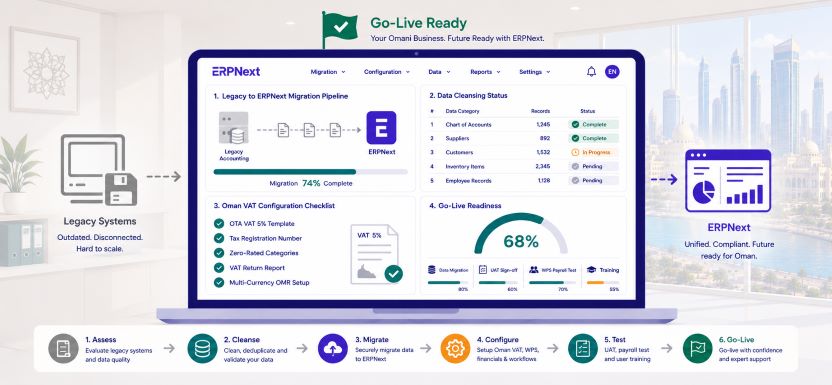
    Migrate to ERPNext Oman is a decision thousands of Omani businesses are making right now as the limitations of legacy accounting tools become impossible to ignore. Whether your business currently runs on QuickBooks, Sage, Tally, Peachtree, or a locally built accounting system, the same pattern emerges at a certain point in growth: the software cannot handle Oman VAT the way the Oman Tax Authority requires, WPS payroll file generation is manual and error-prone, multi-currency transactions in OMR require workarounds, and management reporting means exporting to Excel and spending hours building tables that should already exist in the system.

    This guide walks you through every phase of migrating to ERPNext in Oman, from the decision to move through to your first clean month of live operations, with practical guidance built around how Omani businesses actually work.

    Why Omani businesses decide to migrate to ERPNext now

    The trigger for the decision to migrate to ERPNext Oman is rarely a single event. It is usually the accumulation of several compounding frustrations reaching a tipping point simultaneously. The VAT return takes three days to prepare manually because the legacy system does not produce an OTA-formatted report. The payroll team spends four hours every month reformatting salary data into a WPS-compliant SIF file that the accounting software cannot generate automatically. The operations director asks for a real-time stock report and receives an Excel file that is already two days old. A new branch opens in Sohar and suddenly the finance team is reconciling two separate accounting systems at month-end.

    Each of these problems is individually manageable. Together, they represent a significant drain on staff time, a growing compliance risk, and a ceiling on how efficiently the business can scale. Migrating to ERPNext removes all of them from a single implementation.

    What migrate to ERPNext Oman actually involves: a realistic overview

    Before committing to the migration, Omani business owners and finance directors need a clear picture of what the process actually involves. A migration from legacy accounting software to ERPNext is not simply a data export and import exercise. It involves four parallel workstreams that must be managed simultaneously: configuring ERPNext correctly for Omani regulatory requirements, extracting and cleansing data from the legacy system, training staff on new workflows, and running the legacy system and ERPNext in parallel until the new system is verified and trusted.

    The realistic timeline for a well-managed migrate to ERPNext Oman project for a Muscat-based SME with 20 to 100 employees is eight to fourteen weeks from kickoff to full go-live. Businesses that attempt to compress this timeline below eight weeks almost always pay for the shortcut in configuration errors, dirty data, and user adoption problems that take months to resolve.

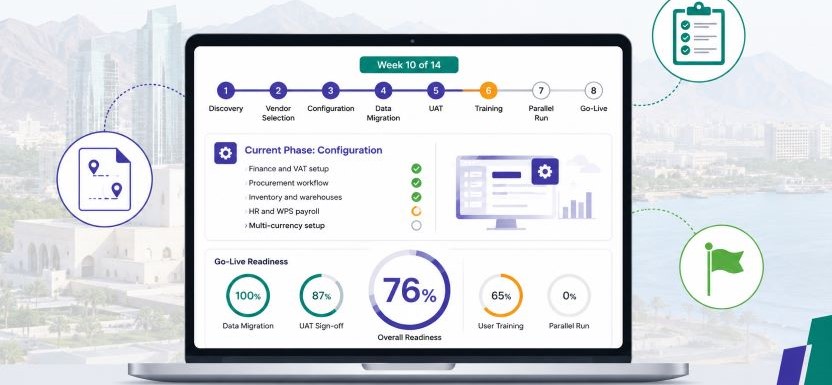
    Migration PhaseDurationPrimary Output
    Legacy system audit and data export1 to 2 weeksClean data extract and gap analysis
    ERPNext configuration for Oman2 to 3 weeksFully configured sandbox environment
    Data cleansing and import1 to 2 weeksVerified master data in ERPNext
    Opening balances and cutover prep1 weekAgreed opening balance sheet
    User acceptance testing1 to 2 weeksSigned UAT sign-off
    Staff training1 weekAll users trained by role
    Parallel run2 to 4 weeksVerified outputs matching legacy
    Go-live and legacy decommission1 weekERPNext live, legacy retired

    Step 1: Audit your legacy system before you migrate to ERPNext Oman

    The single most valuable investment in any ERPNext migration is the pre-migration audit of the legacy system. This audit has two objectives: understanding what data needs to move to ERPNext and identifying which legacy processes should be improved rather than replicated.

    Most Omani businesses that have been running on legacy accounting software for three or more years have accumulated significant data quality problems. Duplicate supplier records with slightly different names. Customer accounts with missing TRN numbers. Inventory items with inconsistent naming conventions. Payroll records with joining dates that do not match employment contracts. Opening balances that were never properly reconciled when the legacy system was first set up years ago. If any of this dirty data migrates into ERPNext unchanged, the new system inherits every problem the old system created.

    The audit produces a data quality report that identifies every cleanup task required before migration begins. This is unglamorous work, but it is the single most important factor in determining whether the migrate to ERPNext Oman project delivers a clean, trustworthy system from go-live day one.

    Step 2: Configure ERPNext for Omani regulatory requirements

    Before a single byte of legacy data is imported, ERPNext must be fully configured for Oman’s regulatory environment. This configuration phase covers six critical areas that are specific to Omani businesses and cannot be skipped or deferred to post-go-live.

    Oman VAT configuration

    Navigate to Accounts then Tax Templates and create the Oman Output VAT 5% and Oman Input VAT 5% templates. Enter your Tax Registration Number in Company Settings under Tax ID. Configure zero-rated and exempt tax categories for any goods or services your business supplies that do not attract the standard 5% rate. Activate the OTA-formatted VAT return report and run it against sample transactions to verify the output matches the format required for submission. The migrate to ERPNext Oman VAT configuration must be tested and verified before any live transactions are posted because correcting VAT misconfigurations after real data exists in the system is significantly more complex.

    Omani Rial base currency and multi-currency setup

    Set OMR as the company base currency in Company Settings before any data is imported. This step cannot be changed after transactions are posted. If your business transacts in USD, AED, EUR, or other currencies, create foreign currency bank accounts for each and configure exchange rate update rules. For import-heavy Omani businesses, activate the landed cost tracking module and map freight, customs duty, and port handling charge categories to the correct inventory valuation accounts.

    WPS payroll and Labour Law configuration

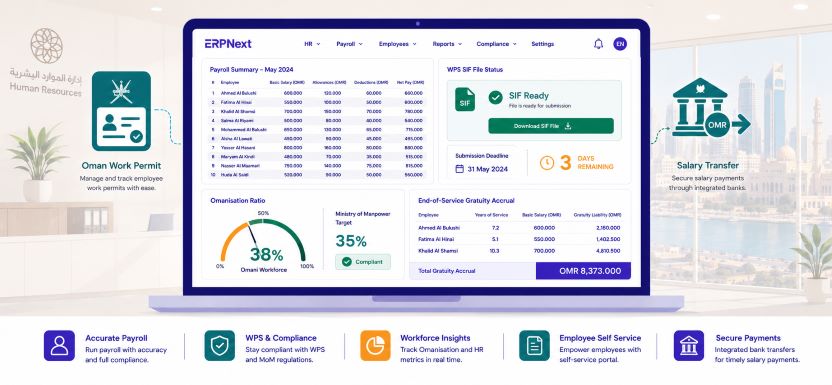
    Configure the payroll module with WPS bank details for every employee, salary components mapped to the correct GL accounts, Omani Labour Law leave entitlements by contract type and nationality, end-of-service gratuity rules for Omani national and expatriate categories, and Omanisation ratio dashboards. Test the WPS SIF file generation against sample payroll data and verify the output format matches your bank’s WPS portal requirements before the first live payroll run.

    Configuration warning: Businesses that attempt to migrate to ERPNext Oman and configure VAT, payroll, and multi-currency simultaneously with data migration almost always experience delays. Configure and test the regulatory setup in a clean sandbox environment first, then begin data migration into a verified system.

    Step 3: Extract, cleanse, and prepare legacy data for migration

    With ERPNext configured and tested in the sandbox, the data migration workstream begins in parallel. The standard sequence for a migrate to ERPNext Oman data migration covers five data categories in strict order.

    Chart of accounts and opening balances must be migrated first. Export your trial balance from the legacy system as at the agreed cutover date. Map each legacy account code to the corresponding ERPNext account in your configured chart of accounts. Import the opening balances and verify that ERPNext produces a balance sheet that matches the legacy system exactly before proceeding to any other data category.

    Customer and supplier master records are migrated second. Before importing, deduplicate all records, standardise naming conventions, verify TRN numbers against OTA records, and confirm payment terms and currency assignments for every international supplier. A Muscat trading company with 200 supplier records typically discovers 15 to 30 duplicates and 20 to 40 missing TRN fields during this cleansing exercise.

    Inventory item master and opening stock are migrated third. Every item code, description, unit of measure, reorder level, and preferred supplier assignment must be verified before import. Opening stock quantities should be confirmed through a physical count conducted on the cutover date rather than relying on legacy system figures, which are frequently inaccurate due to unrecorded adjustments.

    Employee records are migrated fourth, covering joining dates, nationality, basic salary, allowance structure, leave balances, and WPS bank account details for every active employee. End-of-service gratuity accruals calculated from the joining date must also be entered as opening balances in the provision account.

    Open transactions are migrated last. These include unpaid supplier invoices outstanding as at the cutover date, outstanding customer invoices, and active purchase orders that have not yet been fully received and invoiced. Only genuinely open transactions should be migrated. Paid invoices and completed orders remain in the legacy system as historical records.

    Use ERPNext’s import tool with CSV templates for each data category rather than attempting manual entry. The import tool validates data against configured rules before posting, catching errors before they enter the live system rather than after.

    Step 4: Opening balance verification and cutover preparation

    Before any user logs into ERPNext for live transactions, the finance manager must sign off on a formal opening balance verification. This sign-off confirms that the ERPNext balance sheet as at the cutover date matches the legacy system trial balance to the last OMR, that all open invoices in ERPNext match the aged debtor and aged creditor reports from the legacy system, and that opening stock valuations in ERPNext match the physical count conducted at cutover.

    This verification is not a formality. It is the moment that establishes whether the migrate to ERPNext Oman project has produced a trustworthy starting point or whether it has imported errors that will compound with every subsequent transaction. Any discrepancy identified at this stage must be investigated and resolved before go-live proceeds. For a full overview of ERPNext financial capabilities for Omani businesses, visit our ERPNext implementation guide for Omani businesses.

    Step 5: User acceptance testing specific to Omani workflows

    User acceptance testing for a migrate to ERPNext Oman project must cover every workflow that is specific to Oman’s regulatory environment, not just generic ERP functionality. The UAT checklist must include:

    • Raise a supplier invoice in USD and verify the OMR equivalent is calculated at the correct exchange rate with VAT posted to the correct OTA account
    • Run the monthly payroll and verify the WPS SIF file generates in the format accepted by your Muscat bank’s WPS portal
    • Run the quarterly VAT return report and verify the output VAT, input VAT, and net payable figures match a manually calculated control total
    • Process an employee separation and verify ERPNext calculates the end-of-service gratuity correctly under the applicable Omani Labour Law scenario
    • Run the Omanisation ratio report and verify headcount and nationality figures match the HR records imported during migration

    Every test that fails is logged, fixed, and retested before UAT sign-off. No migrate to ERPNext Oman project should proceed to go-live with outstanding UAT failures against any Oman-specific compliance workflow.

    Step 6: Parallel run and go-live

    The parallel run phase is the final validation before the legacy system is retired. For two to four weeks, every transaction is processed in both systems and the outputs are compared. The parallel run is particularly important for migrate to ERPNext Oman projects because it validates that the VAT calculation, payroll output, and stock valuation in ERPNext match what the legacy system would have produced for the same transactions.

    Go-live should be scheduled at the start of a new month to create a clean accounting period boundary. On go-live day, the legacy system is locked for new transactions, ERPNext opens the new period, and all staff begin transacting exclusively in ERPNext. The implementation partner should be available for the full first week of live operations to resolve any questions that arise from real transactions that the training scenarios did not fully cover.

    Common migrate to ERPNext Oman mistakes and how to avoid them

    • Migrating dirty legacy data without cleansing, then spending months correcting errors in the live system
    • Configuring VAT after data migration rather than before, creating unposted VAT on historical transactions
    • Skipping the parallel run to save two to four weeks, then discovering configuration errors only after the legacy system has been retired
    • Not testing the WPS SIF file format before the first live payroll run, risking a Ministry of Manpower compliance breach
    • Attempting to migrate all historical transaction history rather than just opening balances and open items, which creates unnecessary complexity and import errors
    • Going live at year-end or quarter-end rather than at the start of a clean period, complicating the first VAT return

    Master your migrate to ERPNext Oman project with the right approach

    Migrate to ERPNext Oman is one of the highest-ROI investments a growing Omani business can make, but only when the migration is planned and executed correctly. The businesses that follow the phased approach in this guide, audit before migrating, configure before importing, cleanse before going live, and test before retiring the legacy system, arrive at go-live with a trustworthy, fully compliant ERPNext environment that delivers immediate value. The businesses that rush the process inherit digital versions of the same problems they were trying to solve.

    Contact Gazelle today for a free legacy system audit and migration assessment tailored to your Omani business, covering your current accounting software, data quality, and the fastest path to a clean ERPNext go-live.

  • ERP Implementation Muscat: Master the Step-by-Step Roadmap for Omani Businesses

    ERP Implementation Muscat: Master the Step-by-Step Roadmap for Omani Businesses

    ERP implementation Muscat is one of the most strategically important investments a growing Omani business can make, and one of the most commonly mishandled. The Sultanate’s capital is home to the highest concentration of private sector SMEs, trading companies, contractors, and professional services firms in Oman, and the pressure on these businesses to digitise operations under the Supreme Council for Planning’s Vision 2040 agenda has never been more direct. Yet a significant proportion of ERP projects in Muscat fail not because the software is wrong, but because the implementation is poorly planned, under-resourced, or rushed into production before the business is ready. This guide gives you a clear, honest, phase-by-phase roadmap for a successful ERPNext implementation in Muscat, built around how Omani businesses actually operate.

    Why ERP implementation in Muscat businesses often goes wrong

    Before mapping the correct path, it is worth understanding why so many Muscat ERP projects fail to deliver expected results. The most common failure modes are predictable and entirely avoidable.

    Businesses in Muscat frequently underestimate the internal time commitment required. ERP implementation is not something that happens to your business while operations continue unchanged. It requires active participation from your finance manager, operations lead, HR team, and department heads throughout the project. Companies that assign implementation entirely to a junior IT coordinator while senior staff remain uninvolved almost always experience delays, configuration errors, and poor adoption.

    The second failure mode is attempting to replicate broken processes in the new system. ERP implementation Muscat projects succeed when businesses use the implementation as an opportunity to clean up workflows, eliminate redundant approval steps, and standardise data. Projects that insist on rebuilding every legacy exception and workaround in ERPNext end up with a digital version of the same problem they started with.

    The third failure mode is going live on all modules simultaneously. Trying to implement finance, procurement, inventory, HR, payroll, and sales in a single wave overwhelms both the implementation partner and the internal team. Phased implementations deliver faster ROI and lower disruption.

    Phase 1: Discovery and scoping (Weeks 1 to 2)

    Define the business outcomes you need ERP to deliver

    The first phase of any ERP implementation Muscat project is not a technical exercise. It is a business conversation. Before selecting a vendor, configuring a single setting, or importing any data, your leadership team needs to agree on the specific, measurable outcomes the ERP system must deliver within the first twelve months. Typical outcomes for Muscat businesses include reducing monthly close time from fifteen days to five days, eliminating manual VAT reconciliation before each OTA filing, achieving real-time inventory visibility across two warehouse locations, or generating WPS-compliant payroll in under two hours per cycle.

    Without agreed outcomes, ERP implementation becomes a feature checklist exercise with no clear definition of success. With agreed outcomes, every configuration decision can be evaluated against a simple question: does this help us achieve the result we committed to?

    Map your current processes and identify the gaps

    The discovery phase also requires documenting how your Muscat business currently handles each core process: how purchase requests are raised and approved, how supplier invoices are matched and paid, how inventory is counted and valued, how payroll is calculated and submitted via WPS, and how management reports are compiled. This process map reveals the gaps that ERPNext needs to fill and the legacy workarounds that should be eliminated rather than replicated.

    Involve the staff who actually perform each process in the mapping exercise, not just their managers. The person who processes 50 supplier invoices per week understands the real workflow in a way that no organisational chart or procedure document captures.

    Phase 2: Vendor selection and project planning (Weeks 2 to 3)

    Selecting the right ERPNext implementation partner in Muscat

    ERP implementation Muscat success is as dependent on the implementation partner as it is on the software. ERPNext is a powerful open-source platform, but its configuration flexibility means that a poorly guided implementation can produce a system that technically works but operationally frustrates. When evaluating Muscat-based ERPNext partners, assess four criteria specifically: in-country knowledge of OTA VAT requirements, Ministry of Manpower WPS payroll compliance, Omanisation ratio reporting, and experience with your specific industry vertical.

    Request references from Muscat or Oman-based clients in a similar industry and size range. A partner who has implemented ERPNext for a Muscat trading company will understand the specific challenges of multi-currency import procurement, landed cost tracking in OMR, and Arabic invoice generation in a way that a generic international partner cannot replicate without a costly learning curve on your time and budget.

    Build the implementation project plan

    Once a partner is selected, the project plan should define every phase, deliverable, and milestone with clear dates and named owners on both the partner side and your internal team. The plan must include data migration timelines, user acceptance testing dates, training schedules, parallel run periods, and the go-live date with a defined cutover plan. ERP implementation Muscat projects that operate without a written project plan invariably experience scope creep, timeline drift, and budget overrun.

    Project PhaseDurationKey DeliverableInternal Owner
    Discovery and scoping2 weeksAgreed outcomes and process mapFinance manager
    Vendor selection1 weekSigned implementation contractManaging director
    System configuration3 to 5 weeksConfigured ERPNext environmentImplementation partner
    Data migration2 weeksClean master data in live systemFinance and HR leads
    User acceptance testing1 to 2 weeksSigned UAT sign-off documentDepartment heads
    Training1 weekAll users trained by roleImplementation partner
    Parallel run2 to 4 weeksValidated outputs match legacy systemFinance manager
    Go-live and cutover1 weekERPNext live, legacy system retiredManaging director

    Phase 3: System configuration (Weeks 3 to 7)

    Finance and VAT configuration for Muscat businesses

    The finance module configuration is the foundation of every ERP implementation Muscat project. ERPNext must be configured with the correct chart of accounts reflecting your business structure, Omani Rial set as the base currency, Oman VAT 5% templates for both output and input tax, your Tax Registration Number entered in company settings, and OTA-formatted VAT return reports activated and tested before any live transactions are posted.

    For Muscat businesses that transact in multiple currencies including USD, AED, EUR, or GBP, the multi-currency configuration must be completed at this stage with foreign currency bank accounts created for each currency your business holds, exchange rate update rules configured, and FX gain and loss accounts mapped correctly in the chart of accounts.

    Procurement and inventory configuration

    The procurement module configuration for a Muscat business typically covers the supplier master with payment terms and approved vendor classifications, multi-level purchase approval workflows aligned to your financial authority schedule, request for quotation templates for your most frequently purchased categories, and three-way matching rules for goods-based purchases. Inventory configuration covers warehouse locations, item master data with reorder levels and lead times, and valuation methods appropriate for your business type.

    HR and payroll configuration for Omani compliance

    ERP implementation Muscat projects that include the HR and payroll module must configure WPS salary information file generation, Omani Labour Law leave entitlements by contract type and nationality, end-of-service gratuity rules for Omani national and expatriate employee categories, Omanisation ratio dashboards by department, and the payroll approval workflow with designated finance sign-off before WPS file generation. This configuration directly determines whether your business meets Ministry of Manpower obligations from the first live payroll run.

    Never configure ERPNext against live production data. Build and test the full configuration in a sandbox environment with sample data before any migration of real business records begins. Changes made to live data after transactions are posted are significantly more complex and costly to correct.

    Phase 4: Data migration (Weeks 6 to 8)

    The most underestimated phase of ERP implementation Muscat projects

    Data migration consistently ranks as the phase most underestimated in time, complexity, and business impact by Muscat businesses undertaking their first ERP implementation. The key principle is to migrate only clean, verified data. Every customer record, supplier record, inventory item, and open transaction that enters ERPNext must be accurate before go-live, because errors in master data propagate through every subsequent transaction and report the system generates.

    The standard data migration sequence for a Muscat ERP implementation follows this order: chart of accounts and opening balances, customer and supplier master records, inventory item master with opening stock quantities and valuations, employee records with joining dates, salaries, and leave balances, and finally open transactions including unpaid supplier invoices, outstanding customer invoices, and active purchase orders.

    Data cleansing before migration

    Before importing any data into ERPNext, deduplicate supplier records, standardise item names and codes, verify customer TRN numbers, and confirm opening stock quantities through a physical count. ERP implementation Muscat projects that skipping data cleansing and migrating raw legacy data as-is can take weeks correcting errors in the live system that should have been resolved before a single record was imported.

    Phase 5: User acceptance testing (Weeks 8 to 9)

    Testing every workflow against real Muscat business scenarios

    User acceptance testing is the phase where your internal team verifies that ERPNext behaves correctly for every workflow your Muscat business runs. UAT must be conducted by the staff who will actually use the system, not by the implementation partner alone. Create a test script that covers every key process: raise a purchase request and verify it routes to the correct approver, post a supplier invoice and confirm VAT is calculated correctly in OMR, run the monthly payroll and verify the WPS SIF file generates in the correct format, check the stock valuation report matches the physical count, and run the VAT return report and verify the output matches the manually calculated figure.

    Every failed test is logged, assigned to the implementation partner for resolution, and retested before UAT sign-off. ERP implementation Muscat go-live should not proceed until every critical workflow passes UAT without exception.

    Phase 6: Training (Week 9)

    Role-based training for every Muscat user group

    Training for an ERP implementation Muscat project must be role-specific, not generic. A finance clerk needs to know how to post a supplier invoice, reconcile a bank statement, and run the VAT return report. A procurement officer needs to know how to raise a purchase request, compare supplier quotations, and process a goods receipt. A warehouse manager needs to know how to conduct a stock count, raise a material transfer, and read the inventory valuation report. Delivering a single system-wide training session to all staff simultaneously is one of the most common and most costly implementation mistakes in the Muscat market.

    Phase 7: Parallel run and go-live (Weeks 10 to 14)

    Running ERPNext alongside your legacy system

    The parallel run phase is the final safety net before your Muscat business commits fully to ERPNext. For two to four weeks, every transaction is processed in both systems simultaneously, and the outputs are compared. If the ERPNext payroll run produces a different net pay figure for an employee than the legacy system, the discrepancy is investigated and resolved before the legacy system is retired. If the ERPNext VAT return report shows a different output VAT total than the manual calculation, the configuration is reviewed until the figures reconcile.

    Go-live and cutover planning

    ERP implementation Muscat go-live should be scheduled at the start of a new month or new quarter to create a clean accounting period boundary. The cutover plan defines the exact sequence of closing the legacy system, importing any final transactions, opening the live ERPNext period, and confirming with the implementation partner that all systems are operational before the Muscat office opens for business on go-live day. For a complete overview of ERPNext capabilities for Omani businesses beyond implementation, visit our ERPSoftware Trends.

    Arrange for your ERPNext implementation partner to be available on-site or remotely for the full first week of live operations. The first payroll run, the first supplier payment cycle, and the first end-of-month close in a live system always surface questions that training alone does not fully prepare users for.

    Common ERP implementation mistakes in Muscat and how to avoid them

    • Assigning implementation to a junior team member without senior management involvement, which leads to misconfigured workflows and poor adoption
    • Attempting to go live on all modules simultaneously rather than prioritising finance and procurement first
    • Skipping the parallel run phase to save time, then discovering configuration errors only after the legacy system has been retired
    • Migrating dirty legacy data without cleansing, creating months of correction work in the live system
    • Underestimating the user training requirement, leading to resistance and workarounds that defeat the purpose of the ERP investment
    • Not testing the WPS SIF file format before the first live payroll run, risking a Ministry of Manpower compliance breach in the first month

    Master ERP implementation Muscat with the right roadmap

    ERP implementation Muscat success is not determined by the software you choose. It is determined by how thoroughly you plan, how honestly you clean your data, how rigorously you test, and how seriously you invest in training your team. ERPNext gives Muscat businesses a powerful, open-source, fully localised platform for Oman VAT compliance, WPS payroll, multi-currency finance, and real-time operational visibility. The roadmap in this guide reduces implementation risk, shortens the path to go-live, and maximises the business value your Muscat operation extracts from its ERP investment from the very first month.

    Contact Gazelle today for a free ERP implementation assessment tailored to your Muscat business size, industry, and go-live timeline.

  • Cloud ERP vs On-Premise ERP: Master the Right Deployment Choice for Your Business

    Cloud ERP vs On-Premise ERP: Master the Right Deployment Choice for Your Business

    Cloud ERP vs on-premise ERP is one of the most consequential technology decisions Omani business owners and IT managers face when evaluating ERP platforms in 2024. The choice is not simply about where the software runs. It determines your monthly operating cost, your data sovereignty, your disaster recovery capability, your IT staffing requirement, and how quickly you can scale as your business grows. As Oman’s Information Technology Authority continues to push cloud adoption across the public and private sectors under Vision 2040, the pressure to make an informed, future-proof ERP deployment decision has never been more urgent. This guide gives you a clear, Oman-specific comparison so your business can make the right call with confidence.

    Why cloud ERP vs on-premise ERP matters more than the software itself

    Most Omani businesses evaluating ERPNext, SAP, or any other ERP platform spend the majority of their time comparing features and pricing. Far fewer give equal attention to deployment architecture, even though the deployment model often has a greater long-term impact on total cost of ownership, system reliability, and business agility than the software features themselves. A misconfigured on-premise deployment for a business that lacks in-house IT capacity can cost three to five times more to maintain than its cloud equivalent. A cloud deployment for a business with strict data residency requirements can create compliance problems that outweigh all the operational benefits.

    Cloud ERP vs on-premise Oman decisions require a framework specific to the Sultanate’s infrastructure, regulatory environment, and business operating conditions. That is exactly what this guide provides.

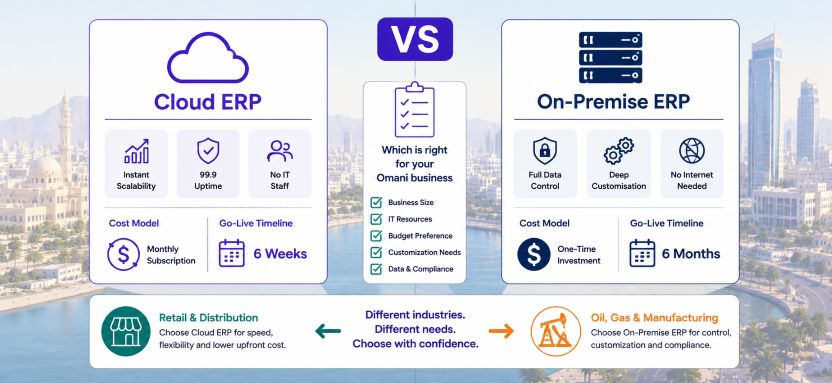
    Cloud ERP vs on-premise ERP: direct comparison across nine decision factors

    Decision FactorCloud ERPOn-Premise ERP
    Upfront capital costLow, subscription basedHigh, server and licence investment
    Monthly operating costPredictable per-user feeVariable, IT staff and maintenance
    Implementation speed4 to 10 weeks typical3 to 9 months typical
    IT staff requirementNone to minimalDedicated server and DBA staff
    Data locationHosted data centre, usually outside OmanOn your premises in Oman
    Customisation depthModerate, cloud-constrainedFull access to codebase
    Disaster recoveryBuilt-in, provider-managedManual setup, your responsibility
    ScalabilityInstantly add users or capacity onlineHardware upgrade required
    Internet dependencyHigh, reliable connection requiredLow operates on the local network

    The case for cloud ERP for Omani businesses

    Lower upfront cost and predictable monthly spend

    The most compelling argument for cloud ERP in the Omani SME context is the absence of capital expenditure. An on-premise ERPNext or SAP deployment requires purchasing servers, networking hardware, operating system licences, backup systems, and UPS power protection before a single user logs in. This upfront investment typically ranges from OMR 5,000 to OMR 40,000, depending on company size and chosen software. Cloud ERP eliminates this entirely. Omani businesses pay a monthly subscription per user, converting a large capital commitment into a predictable operating expense that scales with headcount. For SMEs managing cash flow carefully, this distinction alone often determines the deployment choice.

    No IT infrastructure management burden

    Cloud ERP vs on-premise ERP in Oman comparisons consistently reveal that the hidden cost of on-premise deployment is the ongoing IT management burden. Server patching, database backups, security updates, hardware failures, and capacity upgrades all require either dedicated in-house IT staff or expensive external support contracts. Most Omani SMEs do not have an IT department capable of managing an on-premise ERP server reliably. Cloud ERP shifts this responsibility entirely to the hosting provider. Your team logs in through a browser, and every infrastructure concern is managed by specialists whose entire business is keeping your system running.

    Built-in disaster recovery and 99.9% uptime guarantees

    Oman is not immune to power disruptions, network outages, or hardware failures. An on-premise ERP server without a robust backup and recovery plan represents a single point of failure that can take a business offline for hours or days. Cloud ERP providers operate redundant data centres with automatic failover, daily backups, and contractual uptime guarantees that no Omani SME could afford to replicate with on-premise infrastructure. For businesses whose operations depend on continuous ERP access, this reliability advantage is often decisive.

    Advantage of Cloud ERP: Omani businesses moving from on-premise or manual systems to cloud ERPNext report an average reduction of 35% in total technology operating costs within the first year, driven primarily by the elimination of server maintenance, IT support callouts, and hardware refresh cycles.

    Automatic upgrades and feature releases

    With cloud ERP, every software update, security patch, and new feature release is applied by the provider without any action required from your team. On-premise ERPNext deployments require your IT team or implementation partner to manage upgrades manually, which often means businesses fall behind on versions, miss critical security patches, and pay significant professional services fees for each major version upgrade. Cloud ERP vs on-premise ERP in Oman decisions frequently tip toward cloud on this factor alone for businesses that have experienced the disruption of a delayed on-premise upgrade cycle.

    The case for on-premise ERP for Omani businesses

    Full data sovereignty and residency control

    The most significant advantage of on-premise ERP for Omani businesses is complete control over where data resides. For companies in sectors with data sensitivity requirements, including oil and gas operators, government-adjacent contractors, defence supply chain businesses, and healthcare providers, keeping all business data within their own facilities in Oman removes a category of regulatory and contractual risk that cloud hosting cannot fully address. Cloud ERP vs on-premise ERP Oman decisions in these sectors frequently favour on-premise, specifically because the client contract or regulatory framework requires it.

    Deep customisation without cloud constraints

    ERPNext is open source, meaning the entire codebase is accessible for modification. On-premise deployments allow Omani businesses to customise the system to a depth that cloud-hosted versions restrict. Custom modules, integrations with legacy systems, bespoke industry-specific workflows, and direct database-level modifications are all possible on-premise in ways that cloud deployment policies do not permit. For Omani manufacturers, oilfield services companies, and construction businesses with highly specific operational workflows, this customisation depth can be a decisive factor.

    No internet dependency for operational continuity

    Cloud ERP requires a reliable, consistent internet connection at every location where the system is accessed. For Omani businesses operating field sites in remote desert locations, offshore facilities, or industrial zones with variable connectivity, cloud ERP introduces an operational dependency that on-premise deployment eliminates. An on-premise server operating on the local area network functions regardless of internet availability, ensuring production records, inventory transactions, and payroll processing continue uninterrupted even during connectivity disruptions.

    Omani businesses with remote field operations in Dhofar, the Rub al Khali, or offshore platforms should evaluate hybrid deployment models where a cloud instance handles head office functions and a local on-premise node handles field operations, synchronising when connectivity is available.

    Cloud ERP vs on-premise ERP: which industries lean which way

    Industry SectorRecommended DeploymentPrimary Reason
    Retail and trading SMEsCloudLow IT overhead, fast go-live, scalable
    Construction contractorsCloud or hybridMulti-site access, mobile approvals
    Healthcare clinicsCloudNo IT staff, predictable cost
    Oil and gas servicesOn-premise or hybridData sensitivity, remote site connectivity
    Government-adjacent contractorsOn-premiseData residency requirements
    Manufacturing, small to midCloudAutomatic updates, no server cost
    Manufacturing, large and complexOn-premise or hybridDeep customisation, MES integration
    Professional servicesCloudMinimal infrastructure, fast deployment
    Financial servicesOn-premiseRegulatory data control requirements

    ERPNext: the only Oman ERP platform that supports both deployments equally

    Most enterprise ERP vendors push Omani businesses toward their cloud offering because it generates recurring revenue and reduces their support complexity. ERPNext is different. As an open-source platform, ERPNext supports cloud deployment through Frappe Cloud and other hosting providers, and on-premise deployment on your own servers, with identical functionality in both environments. There is no feature penalty for choosing on-premise, no cloud-only module that forces migration, and no vendor lock-in regardless of which deployment model you select.

    Cloud ERP vs on-premise ERP decisions made with ERPNext are therefore genuinely about what works best for your business, not about what the software vendor prefers to sell you. For a complete overview of ERPNext deployment options and implementation approaches for Omani businesses, visit our ERPNext implementation tips for Omani businesses.

    Cloud ERP vs on-premise ERP: a decision checklist for Omani business owners

    Answer these eight questions to identify which deployment model fits your business:

    1. Does your business have dedicated IT staff capable of managing a Linux server and database backups? If no, lean cloud.
    2. Do your client contracts or industry regulations require data to remain physically within your Oman premises? If yes, lean on-premise.
    3. Does your business operate in locations with unreliable internet connectivity? If yes, consider on-premise or hybrid.
    4. Is your ERP budget structured as capital expenditure or operating expenditure? Capital favours on-premise, operating favours cloud.
    5. Do you need deep system customisation beyond standard ERPNext configuration? If yes, on-premises gives more flexibility.
    6. Is fast implementation a priority? Cloud deployments go live significantly faster than on-premise equivalents.
    7. Do you need to add users or locations quickly as you grow? Cloud scales instantly; on-premise requires hardware planning.
    8. Is disaster recovery and business continuity a top concern with limited internal IT resources? Cloud provides this out of the box.

    Most Omani SMEs with fewer than 100 employees and no specific data residency obligations will find that cloud ERPNext delivers faster implementation, lower total cost, and less ongoing management burden than any on-premise alternative. The exception is almost always connectivity or data sensitivity, not preference.

    Master cloud ERP vs on-premise ERP in Oman with a clear framework

    Cloud ERP vs on-premise ERP in Oman is not a question with a universal answer, but it is a question with a logical framework. Cloud deployment wins on cost, speed, reliability, and scalability for the majority of Omani SMEs. On-premise deployment wins on data sovereignty, customisation depth, and operational independence from internet connectivity for businesses in specific industries or operating environments. ERPNext delivers identical capability in both models, meaning the decision is entirely driven by your business needs and not by software vendor preference.

    The worst outcome is delaying the ERP decision because the deployment question feels unresolved. Choose the model that fits your current constraints, implement ERPNext, and review the deployment architecture in twelve months when you have real operational data to inform any change.

    Contact Gazelle today for a free cloud versus on-premise assessment tailored to your Omani business size, industry, connectivity environment, and data requirements.

  • Digital Procurement Oman: Master Cost Cuts and Faster Approvals with ERPNext

    Digital Procurement Oman: Master Cost Cuts and Faster Approvals with ERPNext

    Digital procurement Oman ERPNext adoption is accelerating across every sector as Omani businesses face simultaneous pressure to reduce operating costs, tighten financial controls, and meet the digitisation expectations set by Vision 2040. Procurement is the single largest controllable cost category for most Omani businesses, whether they are trading companies, manufacturers, contractors, or service providers. Yet the majority of Omani SMEs still manage purchasing through email chains, WhatsApp messages, paper purchase orders, and manual invoice matching. The result is slow approvals, duplicate payments, unauthorised purchases, and no real-time visibility over where the company’s money is being spent. This guide explains how ERPNext transforms procurement for Omani businesses and why the impact is visible within the first month of go-live.

    Why do Oman businesses adopt ERPNext now

    The Supreme Council for Planning has set clear digital economy targets under Vision 2040 that extend beyond government services to private sector operations. Omani businesses that continue to rely on manual procurement processes face a growing competitive disadvantage as larger suppliers, government clients, and international partners increasingly expect digital purchase orders, electronic payment trails, and auditable approval workflows as standard. Beyond compliance readiness, the operational cost of manual procurement is itself a compelling argument for change. Research consistently shows that manual purchase order processing costs four to six times more per transaction than an automated digital workflow.

    Digital procurement Oman ERPNext implementation addresses this cost gap directly while simultaneously giving finance directors, operations managers, and business owners the spend visibility they need to make better purchasing decisions.

    Key stats at a glance:

    • 42% of procurement costs in Omani SMEs are tied to manual processing, rework, and emergency orders
    • 3x faster purchase order approval when digital workflows replace email chains
    • OMR 0 additional licence cost for the full ERPNext procurement module
    • 60% reduction in duplicate supplier invoices after three-way matching is activated

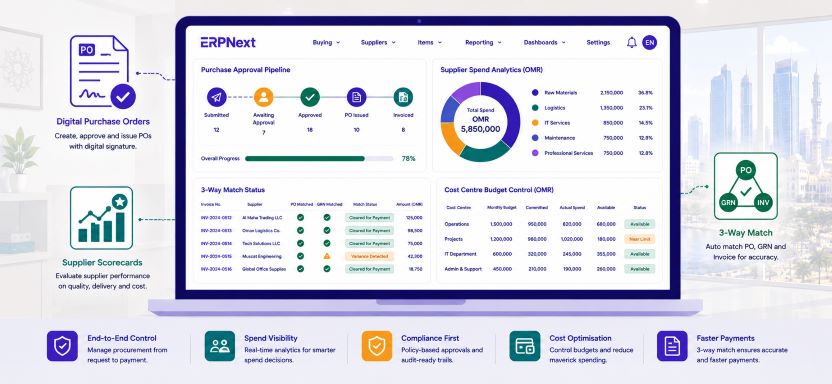
    Digital procurement Oman ERPNext: before and after comparison

    Procurement StepWithout ERPNextWith ERPNext
    Purchase requestEmail or WhatsApp to line managerDigital form with auto-routing to approver
    Approval processEmail chain, 3 to 7 days averageDigital workflow, same day to 48 hours
    Supplier selectionPersonal relationships, no performance dataApproved vendor list with scorecard data
    Purchase orderManual Word or Excel template, emailedAuto-generated, numbered, linked to request
    Price comparisonAd hoc, no system recordSupplier quotation comparison in ERPNext
    Invoice matchingManual check against paper POThree-way match: PO, GRN, and invoice
    Spend visibilityMonth-end report from the accountantLive dashboard by supplier, category, project
    Budget controlNo real-time check, overruns discovered lateAuto-block if purchase exceeds cost centre budget
    Audit trailEmail threads, lost attachmentsFull digital history per transaction
    Landed cost trackingManual import cost allocationAuto-calculated per shipment in OMR

    Streamlining purchase requests and approvals with ERPNext in Oman

    Digital purchase request forms with automatic routing

    The digital procurement workflow in Oman ERPNext begins the moment a staff member raises a purchase request through the ERPNext web interface or mobile app. The request captures the item description, quantity, estimated cost, required date, project or cost centre code, and justification. Upon submission, ERPNext routes the request automatically to the correct approver based on the value and the cost centre, eliminating the delay that occurs when requests are emailed to the wrong person, left in an inbox over a weekend, or verbally approved with no written record.

    Multi-level approval workflows configured for Omani business structures

    ERPNext approval workflows can be configured to match the exact financial authority structure of any Omani business:

    Purchase ValueApprovers RequiredERPNext Workflow Behaviour
    Up to OMR 500Department headMobile notification, approve or reject in app
    OMR 501 to 2,000Department head then finance managerSequential two-step, both notified by system
    OMR 2,001 to 10,000Finance manager then General ManagerSequential two-step, escalates if no response in 24 hrs
    OMR 2,001 to 10,000Finance manager, GM, and Managing DirectorThree-step sequential with full audit log
    Any amount, new supplierFinance manager plus procurement reviewTriggered by supplier flag on purchase request

    Every approval or rejection is timestamped, attributed to a named user, and stored permanently against the purchase record. Approvers receive mobile notifications and can approve from anywhere in Oman or abroad, eliminating the bottleneck of needing a senior manager physically present in the office to sign a purchase order.

    Omani businesses that switch from email-based purchase approvals to ERPNext digital workflows typically reduce average approval time from three to seven days down to four to twenty-four hours for standard procurement requests.

    Supplier management and cost control with digital procurement, Oman ERPNext

    Approved vendor lists and supplier qualification

    One of the most effective cost control mechanisms available to Omani procurement managers is restricting purchases of specific item categories to pre-qualified, price-negotiated suppliers. ERPNext supports approved vendor lists at the item level, meaning a purchase order for a specific material can only be raised against suppliers who have been pre-qualified, price-checked, and approved by the procurement team. This prevents maverick spending, eliminates the use of unknown suppliers for critical items, and ensures negotiated rates are applied consistently across every department and project site.

    Supplier quotation comparison and price benchmarking

    Digital procurement Oman ERPNext includes a built-in request for quotation module that allows procurement teams to send RFQs to multiple suppliers simultaneously and compare their responses in a side-by-side matrix. Price, lead time, payment terms, and additional charges are all captured against each supplier’s response. The lowest compliant quotation can be converted to a purchase order in one click, with the comparison matrix permanently attached to the PO record as an audit document. This replaces the informal phone or email comparison that leaves no record and makes it impossible to verify that the best value option was actually selected.

    Three-way matching to eliminate duplicate and fraudulent invoices

    ERPNext automatically matches every supplier invoice against the original purchase order and the goods receipt note before allowing payment processing. If the invoice value exceeds the PO value, or if goods were never received, ERPNext blocks the payment and alerts the finance team. Digital procurement Oman ERPNext three-way matching eliminates duplicate supplier invoices, inflated quantities, and fictitious deliveries that cost Omani businesses significantly each year and are almost impossible to catch in a manual system.

    Businesses implementing ERPNext three-way matching consistently report a 60% reduction in duplicate invoice processing in the first six months. Every blocked payment attempt is logged with the reason, creating an audit trail that satisfies both internal and external auditor requirements.

    Spend analytics and procurement visibility with ERPNext in Oman

    Live procurement dashboards for Omani managers

    Digital procurement Oman ERPNext delivers real-time spend analytics that most Omani businesses have never had access to before. The following eight analytics views are available as standard in ERPNext without any custom development:

    Analytics ViewWhat It Shows for Omani Procurement Managers
    Spend by supplierTop 10 suppliers by OMR value, month or year to date
    Spend by categoryRaw materials, services, IT, logistics, and other cost codes
    Spend by projectCost per active project or contract for job costing
    Spend by cost centreDepartment-level procurement cost for budget accountability
    Supplier lead timesAverage days from PO to delivery per supplier
    On-time delivery ratePercentage of orders delivered within agreed lead time
    Price varianceActual cost versus last purchase price per item
    Emergency order ratePercentage of POs raised as urgent, flagged for review

    Budget control and cost centre spend limits

    ERPNext allows Omani finance teams to set monthly or annual procurement budgets per cost centre, department, or project. When a purchase request would exceed the available budget, ERPNext can be configured to either block the request automatically or send an alert to the budget owner for authorisation. This real-time budget control replaces the end-of-month discovery that a department has overspent its procurement allocation.

    Landed cost tracking for import-heavy Omani businesses

    For Omani trading companies, manufacturers, and contractors sourcing goods internationally, the supplier invoice is only one component of the total procurement cost. Freight, insurance, customs duties, and port handling charges can add 15% to 35% to the landed cost per unit. ERPNext landed cost tracking captures all of these charges against each import shipment and allocates them to the correct inventory valuation automatically. Digital procurement Oman ERPNext landed cost accuracy means margin calculations, pricing decisions, and stock valuations reflect the true cost of goods.

    Omani businesses implementing ERPNext landed cost tracking for the first time consistently discover their true procurement costs are 12% to 25% higher than their invoice-only figures suggested. This insight alone often justifies the entire ERP investment within the first quarter.

    Implementing digital procurement Oman ERPNext: a practical roadmap

    Most Omani businesses can complete a focused ERPNext procurement implementation in six to ten weeks:

    1. Weeks 1 to 2: Configure the supplier master with approved vendor classifications, payment terms, and default currency. Import historical supplier data and set up item categories with cost centre mapping.
    2. Weeks 2 to 3: Build the procurement approval workflow matrix based on your financial authority schedule. Configure mobile approval notifications for senior managers.
    3. Weeks 3 to 4: Activate the request for quotation module, set up supplier comparison templates, and configure approved vendor list restrictions for critical item categories.
    4. Weeks 4 to 5: Enable three-way matching rules for goods-based purchases and configure invoice variance tolerance levels for your finance team.
    5. Weeks 5 to 7: Set up cost centre budgets, monthly spend limits, and budget alert rules for each department or project.
    6. Weeks 7 to 10: Train procurement, finance, and operations teams, run parallel processing alongside the old system for two to four weeks, then go live.

    The fastest ROI in digital procurement Oman ERPNext implementations consistently comes from activating approval workflow automation and three-way matching in the first phase. These two features alone eliminate the highest-volume manual tasks and the most costly financial control gaps.

    Digital procurement as part of a fully integrated Omani ERP system

    Digital procurement Oman ERPNext delivers the greatest value when the procurement module operates as part of a fully integrated business system. Purchase costs are posted directly to project cost centres. Inventory reorder signals from the warehouse module trigger procurement requests automatically. Supplier invoice payments flow through accounts payable with full bank reconciliation. VAT on purchases is captured and reconciled for OTA return filing without any manual data transfer. For a complete overview of ERPNext as a fully integrated platform for Omani businesses, visit our ERPNext implementation tips for Omani businesses.

    Master digital procurement in Oman with ERPNext

    Digital procurement Oman ERPNext gives businesses across the Sultanate the tools to cut procurement costs, accelerate approval cycles, eliminate duplicate payments, and achieve real-time visibility over every purchase from request to payment. The transition from manual procurement to a fully digital ERPNext workflow is not a multi-year enterprise transformation. It is a six to ten-week implementation that most Omani SMEs can complete without disrupting daily operations, and the financial impact is typically visible within the first full procurement cycle after go-live.

    Every month that procurement remains manual is another month of paying more than necessary, approving too slowly, and discovering cost overruns after the commitment has already been made.

    Contact Gazelle today for a free digital procurement assessment and discover exactly how much your Omani business is currently spending on manual procurement processes that ERPNext can automate.

  • Oman End-of-Service Gratuity ERPNext: Master Automatic Gratuity Calculations for Omani Employers

    Oman End-of-Service Gratuity ERPNext: Master Automatic Gratuity Calculations for Omani Employers

    Oman end-of-service gratuity ERPNext automation is one of the most practically valuable features available to any Omani private sector employer managing a mixed-nationality workforce. End-of-service gratuity is not optional in Oman. It is a statutory financial obligation defined precisely by the Ministry of Manpower under the Omani Labour Law, and the consequences of calculating it incorrectly range from costly disputes and Ministry complaints to labour court proceedings. For businesses managing dozens or hundreds of employees across different nationalities, tenures, and termination scenarios, manual gratuity calculation is a significant source of financial risk. ERPNext eliminates this risk entirely by automating every calculation, tracking every accrual, and generating every payment certificate in full compliance with Omani Labour Law. This guide explains exactly how it works.

    Understanding Oman’s end-of-service gratuity under the Omani Labour Law

    Oman end-of-service gratuity ERPNext configuration begins with a precise understanding of the underlying legal framework. Omani Labour Law sets gratuity entitlements based on three intersecting variables: the employee’s nationality, the reason for separation, and the length of service. The interaction between these three variables creates a matrix of calculation scenarios that is straightforward for a single employee but becomes a significant administrative burden when applied manually across a large or growing workforce.

    The table below maps the complete gratuity entitlement framework that ERPNext applies automatically for every Omani business:

    NationalityReasonTenureGratuity RateEntitlement Level
    Omani nationalResignation1 to 3 years15 days basic salary per yearPartial
    Omani nationalResignationOver 3 years1 month basic salary per yearFull
    Omani nationalTerminationAny tenure1 month basic salary per yearFull
    Omani nationalRetirementAny tenure1 month basic salary per yearFull
    ExpatriateResignationUnder 1 yearNo entitlementNone
    ExpatriateResignation1 to 3 yearsOne third of 15 days per yearReduced
    ExpatriateResignation3 to 5 yearsTwo thirds of 15 days per yearReduced
    ExpatriateResignationOver 5 years15 days basic salary per yearFull
    ExpatriateTerminationAny tenure15 days basic salary per yearFull

    Gratuity is calculated on basic salary only under the Omani Labour Law. Housing allowance, transport allowance, and other regular payments are excluded from the gratuity calculation base. ERPNext applies this distinction automatically by pulling only the basic salary component from the employee payroll record.

    How the Oman end-of-service gratuity ERPNext automation works

    From employee record to automatic gratuity calculation in real time

    Configuration: teaching ERPNext the Omani Labour Law gratuity rules

    Setting up the Oman end-of-service gratuity ERPNext automation requires a one-time configuration of gratuity rules within the HR Settings module. The configuration captures the nationality category, the reason for separation, the tenure band, and the applicable daily or monthly rate for each scenario in the rate table. Once configured, these rules apply automatically to every employee separation processed in the system. There is no manual lookup, no spreadsheet formula, and no risk of the wrong rate being applied due to a data entry error or a misread of the Labour Law text.

    Employee record: the data foundation for accurate gratuity

    Every gratuity calculation in ERPNext draws from three fields in the employee master record: the date of joining, the basic salary at the time of separation, and the nationality. When an employee record is created or updated, ERPNext maintains a live tenure count in years and months from the joining date. If a salary revision is processed, the system updates the gratuity accrual figure automatically using the new basic salary. This means the gratuity liability shown in the finance ledger is always current and not a snapshot from the last manual calculation run.

    Separation processing: triggering the automatic calculation

    When an employee separation is initiated in ERPNext, the HR team selects the reason for leaving from a configured dropdown: resignation, termination, retirement, end of contract, or death of employee. Oman end-of-service gratuity ERPNext logic then applies the correct rate from the configured rule matrix, calculates the exact gratuity entitlement to the day based on the actual last working date, and presents the result for HR and finance review before generating the final payment certificate. The entire process from separation initiation to gratuity figure takes under two minutes per employee.

    ERPNext calculates gratuity to the exact day of service and not rounded to the nearest year. A 4-year and 8-month tenured employee receives the precise pro-rata calculation for the eight months beyond the four full years, consistent with Ministry of Manpower requirements.

    Oman end-of-service gratuity ERPNext worked calculation examples

    The five examples below show how ERPNext applies the correct Labour Law formula for different nationalities, tenure, and separation scenario combinations. All calculations use the basic salary only, consistent with Omani Labour Law:

    Employee ScenarioERPNext Calculation LogicFormulaGratuity Payable
    Omani national, resigned, 5 yrs, OMR 700 basic1 month per year x 5 = 5 monthsOMR 700 x 5OMR 3,500.00
    Expatriate, resigned, 2 yrs, OMR 500 basicOne third of 15 days x 2 yrs = 10 daysOMR 500 / 26 x 10OMR 192.31
    Expatriate, terminated, 8 yrs, OMR 900 basic15 days per year x 8 = 120 daysOMR 900 / 26 x 120OMR 4,153.85
    Omani national, retired, 15 yrs, OMR 1,400 basic1 month per year x 15 = 15 monthsOMR 1,400 x 15OMR 21,000.00
    Expatriate, resigned, 4 yrs, OMR 650 basicTwo thirds of 15 days x 4 yrs = 40 daysOMR 650 / 26 x 40OMR 1,000.00

    ERPNext uses 26 working days as the divisor for daily rate calculations, consistent with Omani Labour Law practice. This is automatically applied to all expatriate gratuity calculations where the entitlement is expressed in days rather than months.

    Gratuity accrual tracking and balance sheet liability management

    Real-time gratuity liability in your Omani balance sheet

    What gratuity accrual mean for Omani businesses

    Gratuity accrual is the progressive accumulation of the gratuity liability your business owes to every active employee at any given point in time. In accounting terms, this is a provision liability that should appear on your balance sheet, growing with every passing month as employees accumulate tenure. Most Omani businesses that manage gratuity manually either do not carry this provision at all, leaving the balance sheet understated, or update it once a year during audit, leaving the figure stale for the other eleven months. Oman end-of-service gratuity ERPNext eliminates both problems.

    Automatic monthly accrual posting in ERPNext

    ERPNext calculates the gratuity accrual for every active employee at the end of each payroll cycle and posts the monthly increase in the gratuity liability to a dedicated provision account in the chart of accounts. The debit entry posts to the gratuity expense account in the profit and loss, and the credit entry posts to the gratuity payable account on the balance sheet. Finance directors see the total end-of-service liability updating in real time after every payroll run without any manual journal entry.

    Live gratuity accrual register across your Omani workforce

    The ERPNext gratuity accrual register shows the accumulated liability for every employee simultaneously, filterable by department, nationality, tenure band, or site. The example below shows a representative accrual register for a mid-sized Omani business:

    EmployeeNationalityTenureBasic SalaryAccrued GratuityNotes
    Ahmed Al BalushiOmani3 yr 4 moOMR 850OMR 2,975.00Resignation, full rate
    Ravi KumarIndian6 yr 2 moOMR 600OMR 2,307.69Resignation, full rate
    Sarah MitchellBritish1 yr 8 moOMR 1,200OMR 307.69Resignation, reduced rate
    Mohammed Al ZaabiOmani9 yr 0 moOMR 1,000OMR 9,000.00Termination, full rate
    Priya NairIndian2 yr 5 moOMR 700OMR 411.54Resignation, one-third rate

    When an Omani external auditor requests the end-of-service liability schedule during the annual audit, ERPNext produces the complete gratuity accrual register with full calculation workings in a single report export. No manual preparation is required, and the figure ties directly to the balance sheet.

    How ERPNext handles salary changes and their effect on the Oman gratuity

    One of the most common gratuity calculation errors in Omani businesses managing this manually is failing to update gratuity calculations when an employee receives a salary revision. Under Omani Labour Law, gratuity is calculated on the final basic salary at the date of separation. ERPNext handles this correctly by design. When a salary revision is processed, the system recalculates the gratuity accrual from the employee’s joining date using the new basic salary figure, and the provision balance updates accordingly. Finance teams do not need to manually recalculate or adjust previous accrual entries.

    A manually managed gratuity spreadsheet not updated after a salary revision will understate the liability if the salary has increased. Oman end-of-service gratuity ERPNext eliminates this risk by recalculating the full accrual balance automatically every time a salary record is modified.

    Generating the gratuity payment certificate and settling the liability

    ERPNext gratuity payment certificate for Omani employees

    Once a separation is processed and the gratuity figure is confirmed, ERPNext generates a gratuity payment certificate in both Arabic and English. The certificate shows the employee’s name, employee ID, joining date, last working date, years and months of service, basic salary, applicable rate, and calculated gratuity amount in OMR. The certificate serves as the formal record of the gratuity settlement and is essential for Ministry of Manpower compliance and any future employee enquiries.

    Settling the gratuity liability in ERPNext

    When the gratuity payment is made, ERPNext processes a payment entry that debits the gratuity payable account on the balance sheet and credits the bank account. The provision balance reduces by the exact amount paid, the liability clears automatically, and the GL audit trail reflects the complete lifecycle from initial accrual to final settlement. For a full overview of how ERPNext manages HR compliance and payroll for Omani businesses, visit our ERPNext HR and payroll implementation guide for Oman.

    Common Oman end-of-service gratuity mistakes that ERPNext prevents

    • Applying the full resignation rate to an expatriate who has served less than three years, overpaying the gratuity entitlement.
    • Using total salary, including allowances, as the gratuity base instead of basic salary only, inflates every calculation.
    • Rounding tenure to the nearest full year instead of calculating to the exact day, which either underpays or overpays the employee.
    • Failing to update the gratuity accrual after a salary revision leaves the balance sheet liability understated.
    • Applying a termination rate to a resignation or vice versa due to a data entry error in a manual system.
    • Not carrying any gratuity provision on the balance sheet creates a large unexpected expense when multiple separations occur in the same period.

    Advantage:  Oman end-of-service gratuity ERPNext automation prevents all six errors above by design. The correct rule is applied from the configured matrix, the basic salary is pulled from the payroll record, tenure is calculated to the day, and the balance sheet provision updates continuously.

    Setting up Oman end-of-service gratuity ERPNext: configuration checklist

    1. Navigate to HR Settings in ERPNext and enable the gratuity module.
    2. Create gratuity rules for each scenario: Omani national resignation at each tenure band, Omani national termination, expatriate resignation at each tenure band, and expatriate termination.
    3. Set the calculation basis to basic salary only, excluding housing, transport, and all other allowances.
    4. Set the daily rate divisor to 26 for day-based expatriate calculations.
    5. Map the gratuity expense account to the correct profit and loss code and the gratuity payable account to the appropriate balance sheet liability category.
    6. Verify that nationality and joining date are correctly populated for every active employee record.
    7. Run a test separation for one Omani national and one expatriate employee with known historical details to validate that ERPNext output matches the expected manual calculation.
    8. Enable automatic monthly accrual posting as part of the payroll close process.

    Run the gratuity accrual report for your full active headcount before go-live and compare the total provision figure to your current balance sheet carrying value. Any difference needs to be reviewed and corrected before ERPNext becomes the system of record.

    Master Oman end-of-service gratuity calculations with ERPNext

    Oman end-of-service gratuity ERPNext automation gives every Omani private sector employer the precision, consistency, and financial visibility they need to meet their Labour Law obligations without manual calculation errors, balance sheet surprises, or employee disputes. The combination of a configured rule matrix, live accrual tracking, automatic salary-change recalculation, and audit-ready payment certificate generation makes ERPNext the most reliable approach to gratuity compliance available to Omani businesses of any size.

    Every Omani business that continues to manage gratuity in a spreadsheet is one salary revision, one disputed termination, or one audit away from discovering how much those manual processes actually cost.

    Contact Gazelle today for a free ERPNext gratuity configuration session and discover how your current workforce gratuity liability compares to what your balance sheet currently shows.

  • WPS Payroll Compliance Oman ERPNext: Master Payroll and Labour Law for Omani Businesses

    WPS Payroll Compliance Oman ERPNext: Master Payroll and Labour Law for Omani Businesses

    WPS payroll compliance Oman ERPNext management is a critical obligation for every private sector employer in the Sultanate, regardless of company size, industry, or workforce nationality. The Wage Protection System, enforced by the Ministry of Manpower Oman, requires businesses to pay employees on time, in the correct amount, and through an approved financial channel, with a compliant SIF file submitted to prove every payment. Penalties for non-compliance are immediate and financially damaging. Beyond WPS, Omani Labour Law imposes precise rules on leave entitlements, end-of-service gratuity calculations, overtime, and Omanisation ratios that HR teams must track and report without error. ERPNext automates the entire payroll and compliance workflow, eliminating the manual processes that generate mistakes, delays, and Ministry of Manpower penalties. This guide covers every aspect of how ERPNext delivers WPS payroll compliance for Omani businesses.

    Understanding WPS payroll compliance in Oman: what businesses must do

    The Wage Protection System was introduced in Oman to ensure employees receive their salaries in full and on time through traceable, bank-verified channels. Under WPS, every private sector employer must generate a Salary Information File (SIF) in the Ministry of Manpower’s prescribed format, upload it to their bank’s WPS portal, and complete salary disbursement within the legal deadline. Late payment, incorrect SIF data, or salary amounts that do not match the registered employment contracts trigger automatic fines and can result in permit suspension that prevents further recruitment.

    Beyond WPS, Omani Labour Law requires employers to calculate annual leave at the correct rate, manage sick leave and maternity leave entitlements, compute end-of-service gratuity accurately based on tenure and salary, and maintain Omanisation workforce ratios by department and company grade. WPS payroll compliance Oman ERPNext handles all of these requirements from a single payroll module that connects directly to the HR, finance, and reporting layers of the business.

    OMR 500 minimum fine per employee per month for WPS non-compliance in Oman72hrs maximum time employers have to process salaries after the payroll due date8 hours average time saved per payroll cycle when ERPNext replaces manual payroll in Oman100% of ERPNext payroll runs generate a WPS-ready SIF file with no manual formatting

    WPS payroll compliance Oman ERPNext versus manual payroll: a direct comparison

    The table below maps eight critical payroll and compliance functions across ERPNext and the manual or legacy system approach.

    Payroll FunctionERPNextManual or Legacy System
    WPS SIF file generationAutomated, one click after payroll runManual Excel formatting per pay period
    Salary payment deadline alertsSystem notification before 72hr deadlineManual calendar reminders, often missed
    Omani Labour Law leave calc.Automatic per contract type and tenureManual lookup and calculation per employee
    End-of-service gratuityAuto-calculated per Omani Labour Law formulaSpreadsheet formula, high error rate
    Omanisation ratio trackingLive dashboard by department and siteMonthly manual headcount report
    Employee self-serviceLeave requests and payslips via portalPaper forms and emailed payslips
    Payroll audit trailFull GL posting per employee per componentNo ledger linkage, summary entries only
    Multi-branch payrollSingle run across all Oman locationsSeparate manual run per branch or site

    WPS SIF file generation with ERPNext: the complete workflow

    From payroll run to bank submission in seven steps

    #StepERPNext Action
    1Run payroll in ERPNextAll salary components calculated, deductions applied, GL entries posted automatically
    2Review payroll summaryHR manager checks total payroll, allowances, and deductions before approval
    3Approve payrollFinance director approves digitally, triggering WPS file generation
    4Download WPS SIF fileERPNext exports the Ministry of Manpower compliant SIF file in one click
    5Upload to bank WPS portalSIF file uploaded to Omani bank WPS system for salary disbursement
    6Salary credited to employeesBank processes payments to employee accounts across all nationalities
    7WPS confirmation receivedBank confirmation imported or manually noted in ERPNext payment entry

    The entire WPS payroll compliance Oman ERPNext workflow from step one to step five takes less than 30 minutes for most Omani businesses, compared to the two to four hours typically spent on manual payroll preparation, spreadsheet formatting, and SIF file construction from a template. The GL postings, salary register, and payslips are all generated as part of the same payroll run, with no separate data entry into the accounting system required.

    Configure ERPNext to send an automated reminder to the HR manager and finance director five days before the WPS salary deadline each month. This eliminates the single most common cause of WPS penalties in Omani SMEs: the deadline being missed during a busy period.

    Omani Labour Law compliance with ERPNext payroll

    Leave management, gratuity, and statutory entitlements

    Annual leave and sick leave management

    Omani Labour Law entitles employees to a minimum of 30 calendar days of annual leave per year after completing one year of service, with leave accruing on a pro-rata basis during the first year. Sick leave entitlements, maternity leave, and emergency leave rules are equally specific. ERPNext configures these entitlements per employee contract type, nationality, and tenure, and tracks every leave request, approval, and balance in real time. Employees submit leave requests through the self-service portal or mobile app, managers approve with a single click, and the leave ledger updates automatically. There is no manual leave card, no HR spreadsheet to update, and no risk of an employee taking more leave than their entitlement allows.

    End-of-service gratuity calculation under the Omani Labour Law

    End-of-service gratuity is one of the most financially significant payroll obligations for Omani employers, and one of the most error-prone when calculated manually. Omani Labour Law sets specific gratuity rates based on the reason for termination, the employee’s nationality, their tenure, and their basic salary. WPS payroll compliance, Oman ERPNext calculates the correct gratuity amount automatically when an employee record is processed for end of service. The table below shows three example gratuity calculations that ERPNext handles without any manual input:

    Employee ProfileBasic SalaryYears of ServiceApplicable RateGratuity Payable (OMR)
    Omani national, resignedOMR 6004 years15 days per year (1-3 yrs), 1 month thereafterOMR 1,140 auto-calculated
    Expatriate, terminatedOMR 9007 years15 days per yearOMR 3,150 auto-calculated
    Omani national, retiredOMR 1,20012 years1 month per yearOMR 14,400 auto-calculated

    ERPNext maintains a running gratuity accrual balance per employee in the finance ledger, giving Omani businesses a real-time view of their total end-of-service liability at any point in the year. This is critical for cash flow planning and audit preparation.

    Overtime calculation and allowance management

    Omani Labour Law specifies overtime payment at 125% of the normal hourly rate for standard overtime and 150% for Friday and public holiday work. ERPNext payroll applies these multipliers automatically based on approved timesheet data, eliminating the manual overtime calculation that generates errors and disputes. Allowances such as housing, transport, and meal allowances are configured per employee grade and applied consistently every payroll cycle without manual entry.

    Omanisation compliance and workforce reporting with ERPNext

    Real-time Omanisation ratios and Ministry of Manpower reporting

    Live Omanisation ratio dashboards

    WPS payroll compliance Oman ERPNext extends beyond payroll processing into strategic workforce management. ERPNext provides real-time Omanisation ratio dashboards that update automatically as staff are hired, transferred, or terminated. HR managers and operations directors can filter the ratio view by department, project site, job grade, or company-wide, and identify departments that are approaching or falling below their Ministry of Manpower required ratio before a compliance breach occurs. This proactive visibility replaces the reactive process of discovering a ratio shortfall during a Ministry inspection.

    Ministry of Manpower report generation

    Periodic workforce reports submitted to the Ministry of Manpower must reflect accurate headcounts, nationality breakdowns, salary levels, and Omanisation ratios as of a specific date. ERPNext generates these reports directly from live HR data with no manual compilation required. The HR team selects the reporting date, runs the report, and exports it in the required format. What previously took two to three days of data gathering across HR, payroll, and operations systems is completed in minutes.

    Multi-branch and multi-site payroll management in Oman with ERPNext

    Omani businesses operating across multiple governorates or project sites often face the additional challenge of managing separate payroll runs, allowance structures, and Omanisation obligations by location. ERPNext supports multi-branch payroll within a single company setup. Each branch or site can have its own cost centre, its own allowance structure, and its own Omanisation target, while the group-level HR dashboard consolidates all headcount, payroll cost, and compliance data for executive reporting. A single payroll approval covers all locations simultaneously, and the WPS SIF file includes employees across every registered site in the correct Ministry of Manpower format.

    Advantage:  WPS payroll compliance Oman ERPNext replaces standalone payroll software, separate leave management tools, manual gratuity spreadsheets, and disconnected HR record systems with a single platform that posts every payroll transaction directly to the GL without any manual journal entry.

    Setting up WPS payroll compliance Oman ERPNext: a practical configuration checklist

    Follow this sequence to configure ERPNext payroll for full Omani WPS and Labour Law compliance:

    1. Create employee records with contract type, nationality, joining date, basic salary, and allowance structure per Ministry of Manpower-registered employment terms.
    2. Configure salary components, including basic salary, housing allowance, transport allowance, overtime, and any performance bonuses, with the correct GL account mapping.
    3. Set up leave types for annual leave, sick leave, maternity leave, and emergency leave with Omani Labour Law entitlement rules per contract type and tenure band.
    4. Configure end-of-service gratuity rules for Omani national and expatriate employee categories with the correct tenure-based rate schedule.
    5. Set up WPS bank details for each employee, including IBAN, bank name, and national identification number in the Ministry of Manpower SIF format.
    6. Define payroll frequency, cut-off dates, and approval workflow with designated approvers for HR review and finance director sign-off.
    7. Configure Omanisation ratio targets by department and activate the live ratio dashboard for HR and operations management visibility.
    8. Set up automated payroll deadline reminders five days before each WPS due date for the HR manager and finance director.

    Implementation note:  Run a parallel payroll for the first two months alongside your existing system to verify that ERPNext calculations match your historical payroll register before fully decommissioning the legacy tool.

    ERPNext payroll is part of a fully integrated Omani business system

    WPS payroll compliance Oman ERPNext is most powerful when the payroll module operates as part of a fully integrated business system rather than as a standalone HR tool. Labour costs are posted directly to project cost centres for construction and services businesses. Payroll expenses flow into the monthly profit and loss without manual journal entries. Leave balances integrate with project resource planning so managers can see staff availability alongside project schedules. Gratuity accruals appear on the balance sheet in real time for accurate financial reporting and audit preparation. For a complete overview of ERPNext as a fully integrated platform for Omani businesses, visit our ERPNext implementation guide for Omani businesses.

    Master WPS payroll compliance in Oman with ERPNext

    WPS payroll compliance Oman ERPNext gives every Omani private sector employer the automation, accuracy, and audit trail they need to meet Ministry of Manpower obligations without consuming their HR and finance teams in manual processing. Automated SIF file generation, Omani Labour Law leave calculations, end-of-service gratuity automation, live Omanisation dashboards, and fully integrated GL payroll posting combine to make ERPNext the most complete payroll compliance solution available to Omani businesses at any price point.

    Every payroll cycle without an integrated system is another cycle of manual risk: missed deadlines, calculation errors, missing SIF data, and compliance gaps that grow more expensive to resolve the longer they are left unaddressed.

    Contact Gazelle today for a free ERPNext payroll compliance demo tailored to your workforce size, industry, and WPS configuration requirements in Oman.

  • ERP Construction in Oman: Master Project Costing and Subcontract Management with ERPNext

    ERP Construction in Oman: Master Project Costing and Subcontract Management with ERPNext

    ERP construction in Oman has accelerated sharply as the Sultanate’s infrastructure investment pipeline grows under Vision 2040. From road and highway contractors in the interior to high-rise residential developers in Muscat and industrial facility builders in Sohar Freezone, Omani construction businesses are managing projects of increasing scale and complexity with financial controls that have not kept pace. The consequences are predictable: cost overruns that erode margins, subcontractor payment disputes that delay projects, retention balances that disappear from tracking, and VAT billing errors that trigger OTA penalties. ERPNext addresses every one of these pain points through a single integrated platform designed for how Omani construction businesses actually operate. This guide explains how.

    Why do ERP construction in Oman businesses need integrated project financial control?

    The Ministry of Housing and Urban Planning continues to oversee substantial public infrastructure programmes across Oman, and the private sector pipeline of commercial, hospitality, and residential projects adds further demand on local contractors and subcontractors. Omani construction companies operating across multiple concurrent projects face a set of financial management challenges that generic accounting software was never designed to solve. Project costs need to be tracked against budgets in real time, not reconciled at the end of the month. Subcontractor payment claims need to be linked to certified progress, not approved on the basis of an invoice alone. Retention money needs to be tracked across dozens of subcontracts simultaneously without falling through the cracks of a spreadsheet. ERP construction in Oman implementation with ERPNext solves all of these challenges from a single platform with no additional modules to purchase and no integration middleware to maintain.

    28% average cost overrun on Omani construction projects without integrated ERP cost tracking45% of subcontractor payment disputes arise from missing documentation and approval gaps10wk typical ERPNext go-live timeline for an Omani construction or contracting businessOMR 0 additional licence cost for ERPNext core project costing and procurement modules

    ERP construction in Oman with ERPNext versus operating without ERP

    The table below compares the eight most critical construction financial management functions across ERPNext and the manual or disconnected approach most Omani contractors currently use.

    FunctionWith ERPNextWithout ERP
    Project budget trackingReal-time cost vs budget per projectManual spreadsheet updated weekly or monthly
    Subcontract managementDigital POs, work orders, and payment claimsPaper-based with email approval chains
    Material cost allocationAuto-posted per project code at receiptManual allocation at month end
    Labour cost trackingTimesheet-linked to project and cost centreSeparate HR system not linked to projects
    Retention managementAuto-calculated and tracked per subcontractManual spreadsheet with high error rate
    Variation order trackingChange orders linked to original contractSeparate log with no cost linkage
    Progress billing to clientMilestone-based invoicing with VAT complianceManual invoice creation per milestone
    Multi-project margin viewLive dashboard across all active projectsConsolidated manually at period end

    Project costing with ERPNext for Omani construction businesses

    Real-time project cost tracking from tender to final account

    Budget setup and cost code structure

    Every construction project in ERPNext begins with a project record that holds the contract value, approved budget broken down by cost category, planned start and finish dates, and client billing milestones. Cost categories can mirror your standard bill of quantities structure: civil works, MEP, finishes, preliminaries, subcontracted packages, and on-site overheads. Every purchase order, supplier invoice, timesheet, and equipment charge posted against the project is allocated to the relevant cost code automatically, giving your quantity surveyors and project managers a live cost view without waiting for the accounts team to run a monthly report.

    Cost versus budget dashboard for Omani project managers

    ERP construction in Oman management becomes genuinely powerful when project managers can see their cost position in real time without raising a report request. ERPNext provides a dedicated project costing dashboard showing committed costs (approved purchase orders not yet invoiced), actual costs (received and posted supplier invoices), and the variance against budget for each cost code. A civil works manager on a Muscat residential project can log in on site, check that concrete and rebar costs are within budget, and raise a variation order request if an unforeseen scope change pushes costs beyond the approved figure. All of this happens without a single spreadsheet being opened.

    Variation order and change management

    Variation orders are among the most financially consequential documents in any construction project, and among the most poorly tracked in businesses operating without ERP. ERPNext links every variation order to the original project and contract record, captures the approved value, updates the project budget, and generates a revised billing schedule automatically. Your commercial team always works from the current approved contract value, not a manually updated spreadsheet that may be two versions behind the project reality.

    Result:  Omani construction businesses using ERPNext for project costing report a significant reduction in end-of-project financial surprises because cost overruns are visible in real time rather than discovered during the final account.

    Progress billing and client invoicing

    Client billing in Omani construction is milestone-based or progress-claim-based, and each invoice must be VAT-compliant with the correct Oman Tax Authority invoice format. ERPNext generates progress invoices against project milestones with full VAT calculation, TRN display, and Arabic or English output depending on client preference. When a milestone is certified, the billing team raises the invoice directly from the project record in minutes. The invoice flows automatically into the accounts receivable ledger, and the project-level revenue recognition updates without any manual journal entry.

    Subcontract management with ERP construction in Oman, ERPNext

    End-to-end subcontract lifecycle from award to final retention release

    The complete ERPNext subcontract workflow for Omani contractors

    The seven-step workflow below shows how ERPNext manages the full subcontract lifecycle for a typical Omani construction project:

    StepStageERPNext ActionOwner
    1Subcontract PO raisedScope, value, retention, and payment terms captured in ERPNextProject Manager
    2Multi-level approvalFinance and operations directors approve digitallyFinance Director
    3Work order issuedSubcontractor receives digital work order with scopeContracts Team
    4Progress claim receivedClaim entered against PO with certified percentage completionSite Engineer
    5Retention auto-calculatedERPNext deducts configured retention rate from paymentERPNext System
    6Payment certificate generatedVAT-compliant OMR payment certificate issuedFinance Team
    7Retention released at handoverRetention ledger cleared on project practical completionFinance Director

    Retention tracking and automatic deduction

    Retention management is one of the most error-prone manual processes in Omani construction finance. A 5% or 10% retention deduction must be applied to every subcontractor payment claim, tracked as a liability on the balance sheet, and released in two tranches at practical completion and defects liability expiry. ERPNext automates the entire retention lifecycle. The retention rate is configured once per subcontract, deducted from every payment automatically, held in a dedicated retention payable account, and flagged for release when the project stage is certified. Finance teams managing retention across twenty or thirty concurrent subcontracts rely on ERPNext to ensure no retention payment is released early or missed entirely.

    Compliance note:  Incorrect retention handling is one of the most common causes of subcontractor payment disputes in Oman. ERPNext creates a clear, auditable retention ledger that protects both the main contractor and the subcontractor in any payment disagreement.

    Subcontractor performance and document management

    ERP construction in Oman implementation with ERPNext stores all subcontractor qualification documents, insurance certificates, performance bond details, and Ministry of Manpower registration records against the supplier profile. Expiry alerts notify the contracts team before a document lapses, preventing the compliance gaps that hold up project execution or trigger operator audit findings on joint venture projects with government clients.

    Labour cost and material management for Omani construction ERPNext

    Timesheet-based labour allocation to projects

    Direct labour costs are one of the most significant and least accurately tracked cost categories in Omani construction businesses that operate without ERP. ERPNext timesheet functionality allows site supervisors and foremen to log daily crew hours against specific project tasks via mobile. Labour costs are calculated at the configured rate per employee grade and posted directly to the project cost ledger, giving the QS team accurate labour cost accruals at any point in the month without waiting for payroll to close.

    Material requisition and site consumption tracking

    ERPNext material requisition workflows connect the site team directly to the central procurement and stores function. A site foreman raises a material request for a specific project and work package. The system checks the central warehouse’s availability, raises a purchase order if stock is insufficient, and records the material delivery to the site against the project code. When materials are consumed, the issue is posted to the project cost ledger. No unaccounted material costs are sitting in a general stores account at month-end, and no expensive emergency purchases are due to the site team not flagging demand in advance. For a full overview of ERPNext procurement capabilities for Omani businesses, visit our ERPNext implementation and procurement guide for Oman.

    Omanisation compliance and HR management for construction businesses in Oman

    Omani construction businesses are subject to the Ministry of Manpower Omanisation ratio requirements that vary by company size and project type. ERPNext HR and payroll manages WPS-compliant payroll, end-of-service gratuity under Omani Labour Law, and Omanisation ratio dashboards that update in real time as headcount changes on each project. Ministry of Manpower report formats are configured as standard exports, allowing HR teams to submit compliant documentation without compiling data manually across project sites.

    Advantage:  ERP construction in Oman implementation with ERPNext consolidates project costing, subcontract management, procurement, HR compliance, and VAT billing into one system, replacing the four to six disconnected tools most Omani contractors currently operate at a high combined cost.

    Implementing ERP construction in Oman with ERPNext: a phased roadmap

    Most Omani construction businesses can complete a focused ERPNext implementation in 10 to 14 weeks following this sequence:

    1. Weeks 1 to 2: configure the chart of accounts in OMR with project cost centres, set up Oman VAT templates, and define the project cost code structure.
    2. Weeks 2 to 4: build the subcontractor and supplier master data, configure approved vendor lists, and set up multi-level purchase approval workflows.
    3. Weeks 4 to 6: create live project records for all active contracts, import approved budgets by cost code, and set up client billing milestones.
    4. Weeks 5 to 7: configure retention rules per subcontract type, activate the retention payable ledger, and test the full subcontract payment workflow.
    5. Weeks 7 to 9: set up HR records, Omani Labour Law leave policies, WPS payroll, and Omanisation ratio dashboards for all project sites.
    6. Weeks 9 to 12: train QS, commercial, procurement, and finance teams, run parallel operations alongside the legacy system, and go live.

    Implementation:  Prioritise configuring project costing and subcontract management in the first phase. These two modules deliver the highest immediate ROI for Omani construction businesses by eliminating manual cost reporting and subcontractor payment disputes.

    Master construction project control in Oman with ERPNext

    ERP construction in Oman implementation with ERPNext gives contractors, developers, and engineering companies across the Sultanate the financial control infrastructure they need to deliver projects on time, within budget, and in full regulatory compliance. Real-time project costing eliminates end-of-project financial surprises. Automated subcontract management and retention tracking remove the manual processes that generate payment disputes and audit findings. VAT-compliant progress billing and Omanisation HR reporting meet every regulatory obligation without consuming your commercial team’s productive time.

    The Omani construction businesses that invest in proper ERP infrastructure today will be the ones winning larger contracts, passing client audits, and protecting margins as the sector continues to grow under Vision 2040’s infrastructure agenda.

    Contact Gazelle today for a free ERPNext construction assessment tailored to your Omani contracting business, whether you operate in civil construction, MEP, fit-out, or infrastructure development.

  • Multi-Currency Omani Rial ERPNext: Master Multi-Currency Transactions for Omani Businesses

    Multi-Currency Omani Rial ERPNext: Master Multi-Currency Transactions for Omani Businesses

    Multi-currency Omani Rial ERPNext management is a daily operational reality for thousands of businesses across the Sultanate. Whether your company imports goods from Asia and Europe, pays subcontractors in AED or USD, bills international clients in foreign currencies, or simply needs your financial statements to reflect the true OMR value of every transaction, getting multi-currency accounting right is non-negotiable. Manual FX calculations, spreadsheet-based reconciliations, and end-of-month exchange rate adjustments cost Omani finance teams enormous amounts of time and introduce errors that distort your profit and loss, inflate your VAT liability, and misrepresent your cash position. This guide explains exactly how ERPNext automates and manages every aspect of multi-currency transactions with the Omani Rial as the base reporting currency.

    Why multi-currency Omani Rial ERPNext management matters for Omani businesses

    The Central Bank of Oman maintains the Omani Rial at a fixed peg against the US Dollar, giving Omani businesses a stable base rate for USD-denominated transactions. However, the full range of currencies that active Omani trading, services, and manufacturing companies handle daily extends well beyond USD. European equipment imports arrive in EUR or GBP. GCC trade is often settled in AED or SAR. Indian subcontractors’ invoices in INR. Chinese machinery suppliers’ prices in CNY. Each of these currencies moves independently against OMR, creating realised and unrealised foreign exchange gains and losses that must be accurately captured in your accounts.

    Multi-currency Omani Rial ERPNext handles all of this automatically, posting the correct OMR equivalent for every transaction, tracking outstanding foreign-currency balances, and generating FX gain or loss journal entries without any manual intervention from your finance team.

    OMR is pegged at 1 OMR to 2.597 USD, creating predictable FX base rates for Omani businesses65% of Omani SMEs dealing in imports or exports report FX reconciliation as a top finance pain point3 GL entries generated automatically by ERPNext per multi-currency transaction: base, foreign, and gain or lossZero manual FX calculations needed when ERPNext exchange rate automation is fully configured

    Common currencies managed alongside the Omani Rial in ERPNext

    The table below shows the currencies most frequently configured in ERPNext deployments for Omani businesses and their typical business use cases.

    China’s manufactured goods and machinery importsCurrencyCommon Use Case for Omani Businesses
    USDUS DollarOil and gas, international trade, USD-invoiced suppliers
    EUREuroEuropean equipment imports, consultancy services
    GBPBritish PoundUK-based contractors, engineering firms
    AEDUAE DirhamGCC trade, Dubai-sourced goods and logistics
    INRIndian RupeeIndian subcontractor payments, IT services
    SARSaudi RiyalCross-border Saudi trade and logistics
    CNYChinese YuanChina manufactured goods, machinery imports
    OMROmani RialBase reporting currency, all domestic transactions

    How to set up multi-currency Omani Rial ERPNext: step by step

    Configuration: getting ERPNext ready for OMR multi-currency operations

    Step 1: Set the Omani Rial as the default company currency

    The first and most critical step in any multi-currency Omani Rial ERPNext configuration is locking Omani Rial as your company’s base currency in Company Settings. Every transaction entered in any foreign currency will be automatically converted to OMR using the exchange rate active at the transaction date. All financial reports, including the profit and loss statement, balance sheet, and VAT return, will present figures in OMR regardless of the currency in which the original transaction occurred.

    Important:  The company’s base currency cannot be changed after transactions are posted. Always confirm OMR is set before entering any live data into your ERPNext system.

    Step 2: Enable and configure the currencies you transact in

    Navigate to Accounts, then Currency List in ERPNext, and enable every currency your business actively uses. For each currency, you can set a default exchange rate or connect ERPNext to live exchange rate feeds. Omani businesses transacting in USD benefit from the stability of the OMR peg, but EUR, GBP, AED, INR, and CNY rates fluctuate daily and should be updated regularly to maintain accurate financial reporting. ERPNext supports both manual rate entry and automated rate imports from public exchange rate APIs.

    Step 3: Create foreign currency bank accounts

    If your business holds USD, AED, or other foreign currency accounts at a bank in Oman, create a separate bank account ledger in ERPNext for each currency. This allows ERPNext to track the actual foreign-currency balance in each account separately from the OMR equivalent, and to calculate unrealised FX gains or losses when you run period-end revaluation. Multi-currency Omani Rial ERPNext bank reconciliation then reflects both the foreign-currency statement balance and the OMR equivalent simultaneously.

    Step 4: Configure customers and suppliers with their transaction currencies

    Each customer and supplier in ERPNext can be assigned a default transaction currency. A UAE-based client defaults to AED. A European equipment supplier defaults to EUR. When an invoice is raised for that party, ERPNext automatically applies their currency and the current exchange rate, calculates the OMR equivalent, and records both values on the invoice. Your Omani team sees the invoice in the customer’s currency while the accounting system posts the correct OMR figure to the ledger without any manual conversion.

    Foreign exchange gain and loss accounting with ERPNext in Oman

    Automatic FX variance posting: how ERPNext handles the difference

    Realised FX gains and losses on settlement

    When an invoice is raised in a foreign currency, and payment arrives at a different exchange rate, the difference between the invoiced OMR value and the received OMR value is a realised foreign exchange gain or loss. Multi-currency Omani Rial ERPNext posts this variance automatically to a dedicated FX gain or loss account in your chart of accounts the moment the payment is recorded. There is no manual journal entry required and no risk of the variance being missed or posted to the wrong account.

    The example below shows how ERPNext handles a USD invoice paid 30 days later at a slightly different OMR rate:

    EventUSD AmountOMR RateOMR ValueFX Variance
    Invoice raised to UAE clientUSD 10,0000.385OMR 3,850Baseline
    Payment received 30 days laterUSD 10,0000.381OMR 3,810OMR 40 loss posted automatically
    ERPNext journal entry createdAuto-generatedNo manual entryGL updated instantlyRealised FX loss: OMR 40

    Unrealised FX gains and losses on open balances

    At the end of each accounting period, any unpaid foreign currency invoices or outstanding foreign currency bank balances represent unrealised FX exposure. ERPNext’s period-end revaluation tool recalculates the OMR equivalent of every open foreign-currency balance using the closing exchange rate and posts unrealised gain or loss entries to the appropriate accounts. This ensures your balance sheet always reflects the true OMR value of your foreign-currency assets and liabilities, a requirement for accurate financial reporting and Oman Tax Authority compliance.

    Finance tip:  Run the ERPNext currency revaluation tool at the end of every quarter before preparing your VAT return. This ensures your OMR receivables and payables balances are accurate and your input or output VAT calculations are based on correct OMR figures.

    Multi-currency Omani Rial ERPNext and VAT compliance

    VAT on foreign currency invoices

    Omani VAT must be calculated and reported in Omani rials regardless of the currency in which the invoice is issued. ERPNext handles this automatically on every foreign-currency sales invoice and purchase invoice. The VAT amount is calculated on the OMR equivalent of the transaction value at the invoice date exchange rate, and this OMR VAT figure flows directly into the OTA-formatted VAT return report. Omani businesses invoicing international clients in USD or AED do not need to perform any manual VAT conversion. ERPNext calculates, posts, and reports the correct OMR VAT figure without any additional steps.

    Input VAT on foreign currency supplier invoices

    When your Omani business receives a supplier invoice in a foreign currency, ERPNext applies the transaction-date exchange rate to calculate the OMR equivalent and derives the input VAT claim in OMR from that figure. This is particularly important for import-heavy businesses such as trading companies, construction contractors, and oil and gas service providers, where a significant portion of input VAT comes from international supplier invoices. The multi-currency Omani Rial ERPNext VAT reconciliation report shows all input and output VAT in OMR, ready for OTA submission. For a complete guide to ERPNext VAT compliance in Oman, visit our ERPNext VAT and compliance guide for Omani businesses.

    Multi-currency reporting and financial statements in OMR

    Financial visibility: OMR reporting across all foreign currency activity

    Profit and loss and balance sheet in Omani Rial

    Every financial report in ERPNext presents figures in OMR, even when the underlying transactions occurred in multiple foreign currencies. Your monthly profit and loss statement, quarterly balance sheet, and annual accounts all consolidate USD revenues, EUR costs, AED receivables, and INR payments into a single OMR view. Multi-currency Omani Rial ERPNext reporting gives Omani business owners and finance directors the clean, currency-unified financial picture they need for decision-making, bank submissions, and statutory reporting.

    Foreign currency outstanding reports

    ERPNext provides dedicated aged debtor and aged creditor reports that show outstanding balances in both the foreign currency and the current OMR equivalent side by side. An Omani trading company with USD receivables from three different clients and EUR payables to two European suppliers can see the full FX exposure at a glance, updated to the latest exchange rate, without exporting to a spreadsheet or calling the bank for a rate check.

    Setting up multi-currency Omani Rial ERPNext: a practical checklist

    Use this checklist when configuring ERPNext multi-currency for your Omani business:

    1. Set OMR as the company base currency in Company Settings before entering any transactions.
    2. Enable all transactional currencies in the Currency List and set initial exchange rates.
    3. Create separate bank account ledgers in ERPNext for each foreign currency account your business holds.
    4. Assign default transaction currencies to all foreign customers and suppliers in their master records.
    5. Configure FX gain and FX loss accounts in your chart of accounts under other income and other expenses.
    6. Set up a recurring monthly or quarterly reminder to run the currency revaluation tool before period-end closing.
    7. Verify that VAT return reports present all figures in OMR before the first OTA filing period after go-live.

    Pro tip:  Connect ERPNext to a public exchange rate API such as ExchangeRate-API or Open Exchange Rates to automate daily rate updates. This removes the manual rate entry task from your finance team and ensures every transaction uses the correct market rate.

    Conclusion: master multi-currency Omani Rial transactions with ERPNext

    Multi-currency Omani Rial ERPNext management eliminates the most time-consuming and error-prone manual tasks in Omani business finance: FX conversion on invoices, realised gain or loss journal entries, period-end balance revaluation, and VAT calculation on foreign-currency transactions. Once correctly configured, ERPNext handles every one of these tasks automatically, giving your finance team accurate OMR financials in real time and your leadership team the currency-unified reporting they need to make confident business decisions.

    Whether your Omani business transacts in two currencies or twelve, ERPNext scales to handle the full complexity of your foreign exchange environment without additional modules, external tools, or manual workarounds.

    Contact Gazelle today for a free ERPNext multi-currency configuration session tailored to your Omani business’s specific foreign-currency needs.